How to Learn Coding
If you’re trying to understand how to learn coding from scratch, you’ve probably already realised that getting started can feel exciting, confusing, and slightly terrifying all at the same time.
One minute, you’re thinking, “I’d love to work in tech.”
The next, you’re staring at words like Python, JavaScript, HTML, CSS, React, GitHub, frameworks, front-end, back-end, and full-stack – wondering if you’ve somehow accidentally walked into a conversation meant for robots.
You’re not alone.
A lot of people who want to learn coding from scratch get stuck before they even begin – not because they’re incapable, but because there’s so much information out there.
One video tells you to start with Python.
Another says JavaScript.
Someone else says HTML and CSS.
Then another person tells you that you need to build projects, learn GitHub, understand the command line, and have a portfolio before anyone will take you seriously.
It’s a lot.
So, if you’re asking questions like:
- How do I learn coding from scratch?
- How do I start coding from level zero?
- What is coding for beginners?
- Which coding language should I learn first?
- Can I learn coding without experience?
- How do I become job-ready for coding roles?
This blog is for you.
We’ll break down what coding actually is, how to start learning step by step, which languages are useful for beginners, how to build practical experience, and how structured training can help you move from “I’m interested in coding” to “I can actually build something.”
If you’re looking for a more structured route, you can explore our Coding Diploma or Coding Career Programme to build practical coding skills with tutor support, portfolio projects, and career guidance.
What Is Coding for Beginners?
Coding is the process of writing instructions that a computer can understand and follow.
Those instructions tell websites, apps, software, games, systems, and digital tools what to do.
Every time you click a button, submit a form, open an app, search a website, or use an online booking system, code is working somewhere in the background.
Coding is like giving instructions to a very literal assistant. If your instructions are clear, logical, and written in a language the computer understands, the computer can follow them. If something is missing, unclear, or written in the wrong way, the computer doesn’t “guess what you meant”; it just doesn’t work as you want it to.
That might sound frustrating (and it can be at times), but it’s also what makes coding so powerful. Once you understand the logic, you can use code to create websites, automate tasks, build applications, work with data, and solve real problems.
If you are completely new to the subject, you may find it helpful to start with our free webinar:
Is Coding the Same as Programming?
People often use the words coding and programming as if they mean exactly the same thing. They are closely related, but there’s a slight difference.
Coding usually refers to the act of writing instructions in a programming language.
Programming is usually a broader term. It can include planning what the software needs to do, designing the logic, writing the code, testing it, fixing problems, improving performance, and making sure the final product works properly.
For example, if you’re building a calculator, coding is the part where you write the instructions that make the calculator add, subtract, multiply, or divide.
Programming includes the bigger thinking around it:
- What should the calculator look like?
- What happens if the user enters the wrong information?
- How should the result be displayed?
- How do we test that it works?
- How do we fix errors?
So, if you are searching for “how to learn programming” or “how to learn coding”, you are usually looking for the same starting point: learning how to think logically and use code to solve problems.
How to Learn Coding Step by Step
If you are starting from zero, the biggest mistake you can make is trying to learn everything at once.
You don’t need to understand every coding language, framework, tool, and job title before you begin. You just need a sensible starting point.
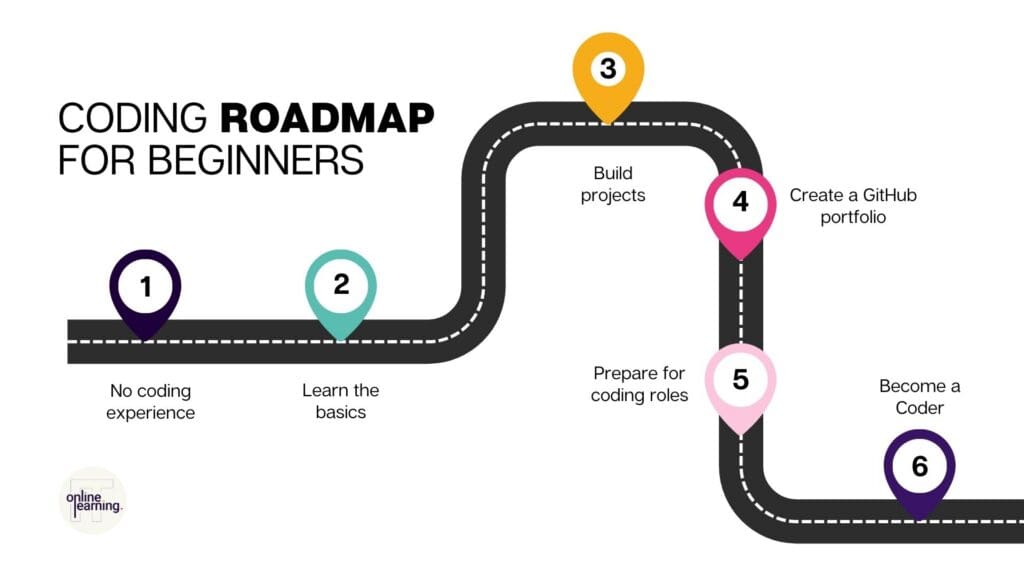
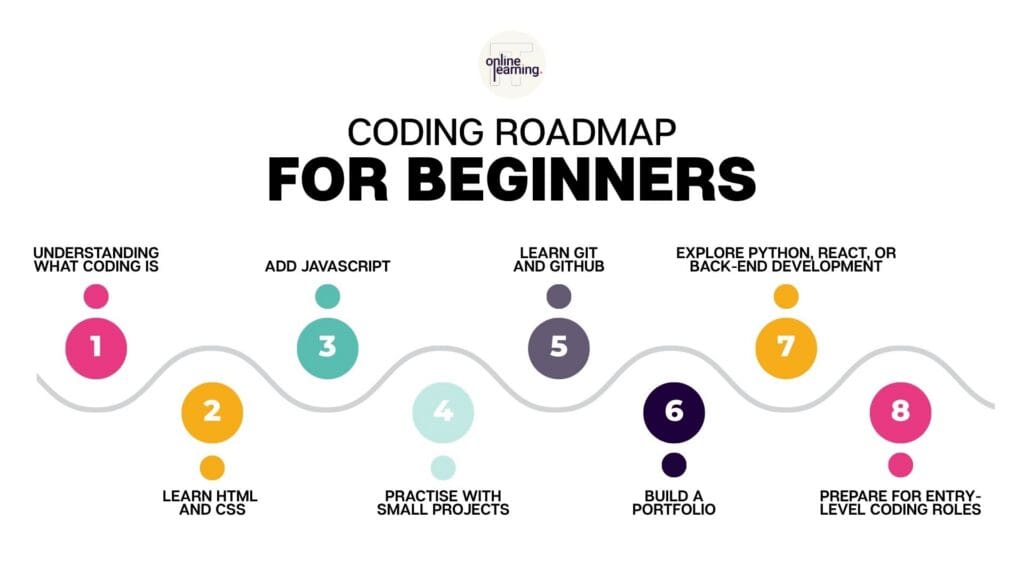
Here’s a beginner-friendly roadmap.
If you would prefer to follow a structured route instead of piecing everything together on your own, you can explore our Coding Diploma, which is designed to help beginners build practical coding skills through guided lessons, projects, tutor support, and portfolio development.
Step 1: Understand the basics of coding
Before choosing a language, take time to understand what coding is used for and how code works at a basic level.
You do not need to become an expert immediately. At this stage, your goal is simply to become familiar with ideas like:
- instructions,
- logic,
- syntax,
- variables,
- functions,
- errors,
- testing, and
- problem-solving.
This gives you a foundation for everything else.
Step 2: Choose a beginner-friendly starting point
For many beginners, the best place to start is with web development basics: HTML, CSS, and JavaScript.
Why?
Because you can actually see what you are building.
- When you write HTML, you can see the structure of a webpage appear.
- When you write CSS, you can see the design change.
- When you write JavaScript, you can make the page respond to user actions.
That visual feedback is really motivating when you’re new.
A good starting point is our HTML & Web Essentials course, which is designed to help beginners learn how to structure webpages and build foundational web development skills.
Step 3: Practise little and often
Coding is not something you learn by only watching videos.
Videos and tutorials are useful, but you need to actually write code yourself.
Instead of trying to study for five hours once a week, it’s usually more useful to practise consistently in small chunks. Even 30 to 45 minutes a day can help you build confidence over time.
Step 4: Build small projects
Beginner projects are important because they help you move from “I watched a lesson” to “I can apply this.”
Start small.
You could build:
- a personal profile page,
- a simple landing page,
- a basic portfolio website,
- a contact form,
- a calculator,
- a quiz,
- a to-do list,
- a simple blog layout, or
- a basic interactive webpage.
These projects don’t have to be perfect. Their purpose is to help you practise and prove that you can use what you have learned.
Step 5: Learn Git and GitHub
Once you start building projects, it’s useful to learn how developers save, manage, and share their code.
That is where Git and GitHub come in:
- Git is used for version control, which helps you track changes to your code.
- GitHub is an online platform where you can store and showcase your projects.
If you’re serious about becoming job-ready, a GitHub portfolio can be very valuable because it gives employers something practical to look at.
Our Git and GitHub course is designed to help learners manage version control, collaborate with code, and build a portfolio that showcases practical coding experience.
Step 6: Build towards a clear career direction
Once you understand the basics, you can start thinking about where you want coding to take you.
You might choose to focus on:
- front-end web development,
- back-end development,
- full-stack development,
- software development,
- Python development,
- app development,
- cloud development, or
- data-related coding roles.
You don’t have to know your final destination on day one. But over time, you want to move from “I’m learning random coding things” to “I’m building skills that support a specific career goal.”
Which Coding Language Should Beginners Learn First?
This is one of the most common questions beginners ask.
The honest answer is: it depends on what you want to build.
There is no single “best” coding language for everyone. A better question is:
What do you want coding to help you do?

HTML: best for webpage structure
HTML stands for HyperText Markup Language and it’s used to structure content on a webpage.
Think of HTML as the skeleton of a webpage. It tells the browser what each part of the page is: headings, paragraphs, links, images, buttons, forms, and sections.
If you want to build websites, HTML is usually one of the first things you should learn.
You can start with our HTML & Web Essentials course or watch our webinar on the Basics of HTML and CSS Properties.
CSS: best for styling webpages
CSS stands for Cascading Style Sheets, and it controls how a webpage looks.
If HTML is the structure, CSS is the design. It controls things like colours, spacing, fonts, layouts, buttons, backgrounds, and responsiveness across different screen sizes.
CSS is important because users interact with experiences. A clear, well-designed webpage can make a huge difference to how people understand and use a website.
You can explore this further through our CSS Essentials course or practise by building a project with our webinar, Build a Portfolio Website with HTML and CSS.
JavaScript: best for interactivity
JavaScript is the language that makes websites interactive.
HTML gives the page structure.
CSS makes it look good.
JavaScript makes it respond.
For example, JavaScript can be used to:
- open menus,
- validate forms,
- create interactive quizzes,
- update content without refreshing the page,
- build calculators,
- create sliders,
- respond to button clicks, and
- power more advanced web applications.
It’s a fantastic language to learn if you want to build interactive websites.
Before learning JavaScript, it helps to understand HTML and CSS first. That’s because JavaScript usually interacts with webpage elements. If you don’t understand how a page is structured, JavaScript can feel much more confusing than it needs to.
Once you’re ready, you can start with variables, data types, operators, functions, conditions, loops, events, the Document Object Model, and debugging.
The Document Object Model, often called the DOM, is what allows JavaScript to interact with the content on a webpage. For example, JavaScript can change text, hide or show elements, respond to clicks, and update the page based on user actions.
Beginner JavaScript project ideas include:
- a button that changes text,
- a light/dark mode toggle,
- a quiz,
- a calculator,
- a to-do list,
- a form validator,
- an image slider, or
- a simple interactive landing page.
A good next step is our JavaScript Essentials course or our free webinar: Introduction to JavaScript.
Python: best for readable, beginner-friendly programming
Python is one of the most popular languages for beginners because its syntax is often easier to read than many other programming languages.
Syntax is the set of rules that govern how code has to be structured or formatted in order to be understood and executed by a computer.
It’s used in many areas, including:
- web development,
- automation,
- data analysis,
- artificial intelligence,
- machine learning,
- scripting, and
- general software development.
Python is a popular choice for beginners because it’s readable, versatile, and widely used.
If you’re wondering how to learn Python from scratch, don’t start by trying to build a huge app immediately.
Start with the basics.
A very sensible plan for learning Python from scratch would be to:
- Learn what Python is used for.
- Set up your coding environment.
- Learn some basic syntax.
- Understand variables and data types.
- Practise conditions and loops.
- Learn how functions work.
- Work with lists, dictionaries, and files.
- Build small Python projects.
- Explore Python libraries.
- Move into a direction like web development, automation, or data.
Some beginner Python project ideas you could look into include:
- a calculator,
- a number guessing game,
- a password generator,
- a simple budget tracker,
- a file organiser,
- a basic quiz, or
- a simple web app using Django.
Our Python Essentials course covers Python fundamentals, including syntax, data types, variables, development environment setup, script writing, and Python libraries.
This is a great starting point if you’re trying to establish how to learn Python from scratch or how to code in Python for beginners.
React: best once you understand JavaScript
React is a JavaScript library used to build modern, interactive user interfaces.
It’s not usually the very first thing beginners should learn – it makes more sense once you already understand HTML, CSS, and JavaScript.
Once you are comfortable with those foundations, React can help you build more advanced front-end applications. Our React Essentials course is designed to help you understand React concepts like components, JSX, state, props, and routing.
Once you’ve got React under your belt, you can also watch our webinar: Develop a Landing Page with React, HTML, and CSS.
Tailwind CSS: best for styling modern websites faster
Tailwind CSS is a utility-first CSS framework that helps developers style websites more efficiently.
What does “utility-first CSS framework” mean? Basically, if websites were made of Lego blocks, this just means instead of giving you a pre-built toy (like a ready-made castle), a utility-first framework gives you a giant box of individual Lego bricks. Each tiny class is like a single brick that does just one job – like making something blue, big, or round – and then you can stack them together directly in your code to build whatever you want from scratch.
This is more useful once you already understand the basics of HTML and CSS. If you are ready to explore modern styling workflows, you can look at our Tailwind Essentials course.
Command line: useful for working like a developer
The command line allows you to interact with your computer using text-based commands.
That might sound a bit intimidating at first, but many developers use the command line to navigate files, run projects, install tools, and manage development workflows.
If you are building towards a coding career, our Command Line Essentials course can help you become more comfortable with this important developer skill.
HTML, CSS and JavaScript: The Web Development Trio
If you want to learn coding for web development, HTML, CSS, and JavaScript are widely considered the best place to begin.
A simple way to understand them is:
- HTML creates the structure.
- CSS controls the style.
- JavaScript adds the behaviour.
So, if you were building a house, HTML would be the walls, rooms, doors, and windows (structure). CSS is the paint, furniture, lighting, and decoration (the style). JavaScript is the doorbell, light switches, heating controls, and anything that responds when someone uses it (for the behaviour).
You need all three to build modern, interactive websites.
What Should Beginners Build First When Learning to Code?
One of the best ways to learn coding is to build small projects.
This is where a lot of beginners go wrong. They think a project has to be impressive before it counts.
It doesn’t.
Your first projects are not supposed to look like Netflix, Amazon, or Spotify. They’re supposed to help you practise.
Start with projects that are simple enough to complete, but challenging enough to make you think.
| Beginner HTML and CSS projects | – Personal profile page – Simple landing page – Recipe page – Product card – Blog layout – Portfolio website |
| Beginner JavaScript projects | – Calculator – Quiz – To-do list – Form validation – Interactive menu – Image slider |
| Beginner Python projects | – Number guessing game – Password generator – Expense tracker – Simple calculator – File organiser – Basic web app with Django |
| Beginner portfolio projects | – Personal portfolio website – Responsive landing page – Small business homepage – Interactive CV page – Project showcase page – Contact form page |
If you want a guided project to start with, try our webinar, Build a Portfolio Website with HTML and CSS.
How Long Does It Take to Learn Coding?
That depends on your starting point, your study routine, and your goal.
You can learn some coding basics pretty quickly. For example, you might understand simple HTML and CSS concepts within a short period of focused study.
But becoming job-ready usually takes longer because employers aren’t just looking for someone who has watched a few tutorials – they want to see that you can apply what you have learned.
That means building practical skills in areas like:
- writing clean code,
- solving problems,
- testing and fixing errors,
- using GitHub,
- creating projects,
- explaining your work,
- building a portfolio, and
- preparing for interviews.
If your goal is to move into a coding career, it’s better to think in terms of readiness rather than speed.
Ask yourself:
- Can I build small projects without copying every step?
- Can I explain what my code does?
- Can I fix the basic errors?
- Do I understand the tools I am using?
- Do I have projects I can show employers?
- Can I talk about my learning in an interview?
If the answer is “Not yet,” that’s okay. It just means you’re still building.
If the answer is “I want to, but I don’t know how to do this by myself”, the Coding Career Programme from ITonlinelearning is designed to support learners over a structured journey, with 12 months of access, no prerequisites, and an average study time of 6 to 8 months.
Can You Learn Coding Without Experience?
es, you can learn coding without experience.
In fact, many people who move into coding start from completely different backgrounds.
You might currently work in customer service, administration, retail, hospitality, finance, education, operations, sales, marketing, or another non-technical role.
That doesn’t automatically hold you back. The key is learning how to build technical skills and combine them with the strengths you already have.
For example:
- If you’ve worked in customer service, you already understand user needs.
- If you’ve worked in administration, you are already organised and detail-oriented.
- If you’ve worked in finance, you’re probably comfortable with accuracy and logical processes.
Coding just adds a new technical layer to those existing strengths.
Do You Need a Degree to Learn Coding?
Some developers have computer science degrees. Others come from coding bootcamps, online courses, apprenticeships, self-study routes, career programmes, or completely different industries.
What matters most is whether you can demonstrate the skills needed for the role.
For beginner coding roles, employers usually look for:
- understanding of coding fundamentals,
- practical project work,
- problem-solving ability,
- willingness to learn,
- GitHub or portfolio evidence,
- communication skills,
- and confidence explaining your code.
A qualification can help because it gives your learning structure and credibility – but practical evidence is also important.
The Coding Diploma is designed to help learners build practical coding skills through hands-on learning, scenario-based lessons, tutor support, and a job-ready GitHub portfolio.
Free Coding Tutorials vs Structured Coding Training
If you are just exploring coding, free tutorials can help you understand whether you enjoy it. They can introduce basic concepts, show you how code works, and help you complete small exercises.
The challenge is that free learning can become messy… very quickly.
You might start one Python video, switch to a JavaScript course, then try a React tutorial, then open a GitHub guide, then realise you still do not understand HTML properly.
Before long, you’ve started ten things and finished none of them.
That doesn’t mean you’re lazy; it just means you don’t have a clear roadmap.
Structured coding training can help because it gives you:
- a clear learning path,
- a sensible order of topics,
- practical exercises,
- portfolio-building projects,
- tutor or mentor support,
- accountability,
- career guidance, and
- a better sense of what “job-ready” actually means.
This is really useful if your goal is not just to “try coding”, but to actually move towards a coding career.
If you want a clearer route, the Coding Diploma is designed to help you build coding skills in a structured order, with practical projects and tutor support.
How to Build a Coding Portfolio
A coding portfolio is a collection of projects that shows what you can do.
For beginners, a portfolio is important because it gives employers practical evidence of your skills. Instead of only saying, “I have learned HTML, CSS, JavaScript, and Python,” you can show projects that prove it.
A beginner coding portfolio might include:
- a personal website,
- a responsive landing page,
- a JavaScript calculator,
- an interactive quiz,
- a React landing page,
- a Python project,
- a GitHub repository,
- and short explanations of what each project does.
Each project should explain what you built, which tools you used, what problem the project solves, what you learned, and what you would improve next time.
This doesn’t need to be perfect. Employers are not expecting a beginner portfolio to look like the work of a senior developer. They are looking for evidence that you can learn, build, solve problems, and explain your thinking.
What Coding Jobs Are Available?
Learning to code can lead to different career paths depending on the skills you build.
Some common options include:
Front-End Developer
Front-end developers work on the part of a website or application that users see and interact with.
They often use:
- HTML,
- CSS,
- JavaScript,
- React,
- responsive design,
- and browser-based tools.
This route would be best for you if you enjoy visual work, user experience, and building things that people interact with directly.
Back-End Developer
Back-end developers work on the behind-the-scenes parts of websites and applications.
They may work with:
- databases,
- servers,
- APIs,
- authentication,
- application logic,
- and back-end programming languages.
This route is ideal for those who enjoy logic, systems, and making sure things work properly in the background.
Full-Stack Developer
Full-stack developers work across both front-end and back-end development.
They understand how the visible part of an application connects to the systems behind it.
This can be a strong long-term route because it gives you a broader understanding of how applications are built.
Software Developer
Software developers build applications, tools, platforms, and systems.
This path usually involves a wide range of languages, technologies, and environments depending on the organisation and role.
Cloud or DevOps-Focused Roles
Some coding learners later move towards cloud development, DevOps, automation, or infrastructure-related roles.
These areas often require additional skills, but coding can provide a strong foundation.
Start Learning Coding with ITonlinelearning
If you’re serious about learning coding from scratch, the most important thing is to follow a route that helps you build confidence, practical skills, and evidence of what you can do.
You don’t have to figure it all out alone.
At ITonlinelearning, we offer structured coding training designed to help beginners develop practical, career-focused skills.
Coding Diploma
The Coding Diploma is designed for learners who want to build strong coding foundations and work towards becoming career-ready developers.
It includes a practical, hands-on learning journey with areas such as:
- HTML,
- CSS,
- Tailwind,
- JavaScript,
- React,
- back-end development,
- cloud development,
- practical projects,
- tutor support,
- and a job-ready portfolio.
This is a strong option if you want a structured way to learn coding and build practical evidence of your skills.
Coding Career Programme
If your goal is to move into a coding career, the Coding Career Programme offers a wider support package.
It includes:
- 12 months of programme access,
- no prerequisites,
- structured coding training,
- 1:1 tutoring,
- personal study coach support,
- interactive coding experience,
- CV and LinkedIn review,
- interview preparation,
- recruitment support,
- and portfolio development.
This can be especially helpful if you are changing careers, starting from scratch, or unsure how to move from learning coding to applying for roles.
Helpful Coding Courses for Beginners
Depending on where you want to start, you can explore individual coding courses as well.
Start with web foundations
If you want to build websites, start with:
Build more modern front-end skills
Once you understand the basics, explore:
Learn programming and back-end skills
If you are interested in broader programming, explore:
Learn developer tools
To work more like a developer, explore:
Frequently Asked Questions
Start by learning what coding is, then choose a beginner-friendly starting point. For many people, HTML, CSS, and JavaScript are useful first steps because they allow you to build visible web projects. Python is also a strong beginner language if you want to learn general programming.
You can learn coding from scratch by following a structured roadmap, practising regularly, building small projects, and gradually developing a portfolio. The key is not to jump randomly between different languages and tutorials. Start with the basics, apply what you learn, and build from there.
Many beginners find Python easier to read because its syntax is pretty clear. For web development, HTML and CSS are usually easier starting points because you can quickly see the results of your work in a browser.
If you want to build websites and interactive web pages, JavaScript is a strong choice. If you want to learn general programming, automation, or data-related skills, Python may be a better starting point. Both are useful, but the right choice depends on your goals.
Yes. Many people start learning coding with no previous technical experience. What matters is building the right foundations, practising consistently, creating projects, and learning how to show your skills through a portfolio.
Not always. Some coding roles ask for a degree, but many employers find practical skills, projects, portfolios, certifications, and evidence that you can solve problems to be better hiring criteria. A structured course or diploma can help you build credibility and confidence.
You can learn basic coding concepts relatively quickly, but becoming job-ready usually takes longer. The timeline depends on your study routine, chosen pathway, and how much practical project work you complete.
Good beginner projects include a personal webpage, landing page, portfolio website, calculator, quiz, to-do list, form validator, password generator, or simple Python app. Start small, then build more complex projects as your confidence grows.
Coding can feel difficult at first because it requires a new way of thinking. You need to become comfortable with logic, problem-solving, mistakes, and debugging. But with the right structure and enough practice, beginners can absolutely learn to code.
The best way to become job-ready is to combine structured learning with practical projects, portfolio development, GitHub experience, career support, and interview preparation. That way, you are not only learning coding theory – you are building evidence that you can apply your skills.
You do not need to know everything before you start learning to code
Learning coding from scratch can feel overwhelming, especially when there are so many languages, tools, and opinions online.
But you don’t need to master everything at once.
You just need to start with the right foundations, practise consistently, build small projects, and follow a clear route towards your goal.
If you are exploring coding for the first time, start with the basics. Learn what coding is. Try HTML and CSS. Experiment with JavaScript. Explore Python. Build something small. Then build something slightly better.
Explore the Coding Diploma if you want to build practical coding skills through structured training and portfolio projects.
Explore the Coding Career Programme if you want the full career-change pathway, including tutor support, study coaching, CV and LinkedIn review, interview preparation, and recruitment support.