How to Code When You Have No Previous Experience
How to code is one of those questions that can feel much more complicated than it really is.
You may have heard people talking about Python, JavaScript, front-end development, back-end systems, frameworks, databases, Git, cloud computing, and dozens of other technical terms. When you’re starting from zero, it can sound as though you need to understand everything before you can write your first line of code.
You don’t.
Coding just means writing instructions that a computer can understand. You use a coding language to tell a computer what you want it to display, calculate, store, change, or do.
For example, code can tell a website to:
- Display a heading.
- Change the colour of a button.
- Open a menu when someone clicks it.
- Check whether an email address has been entered correctly.
- Save a customer’s details.
- Calculate the total price in a shopping basket.
You don’t have to begin by building a complicated app or mastering several coding languages. The most effective way to learn how to code is to start with one simple concept, practise it, see what happens, and gradually add new skills.
Think of it like learning to cook. You wouldn’t begin by trying to prepare an entire restaurant menu. You might first learn how to chop ingredients, follow a recipe, use the oven safely, and prepare one complete meal.
Coding works in much the same way. You learn a few basic building blocks and then combine them to create something useful.
| Stage | What you learn | What you can begin creating |
| 1 | HTML | The structure and content of a web page |
| 2 | CSS and Tailwind CSS | Colours, layouts, spacing, and responsive designs |
| 3 | JavaScript | Interactive buttons, menus, forms, and page features |
| 4 | React | More advanced, reusable website components |
| 5 | Back-end coding and databases | Systems that store, process, and retrieve information |
| 6 | Git and GitHub | A professional record of your code and projects |
| 7 | Cloud fundamentals | How modern applications are hosted and supported |
The same progressive approach is built into the ITonlinelearning Coding Diploma. Instead of expecting beginners to choose between dozens of disconnected courses, languages, and tutorials, the Diploma follows a clear four-level pathway.
You begin with the visible foundations of website development, including HTML, CSS, and Tailwind. You then move into JavaScript and React, back-end development and SQL, and finally cloud and AI-related skills. This means you always know what you are learning, why you are learning it, and how it connects to the next stage.
This guide will take you through that journey step by step, explain how coding works in plain English, and show you how to develop practical skills without becoming overwhelmed.
What Is Coding?
Coding is the process of writing instructions for computers.
Computers can process information extremely quickly, but they need precise instructions. They can’t guess what you meant or fill in missing information in the same way that another person might.
A coder writes these instructions using a programming language.
Different languages have different rules, but the basic idea is similar to learning any spoken language. You learn its vocabulary, understand how sentences are structured, and then combine individual elements to communicate something meaningful.
For example, a simple line of HTML might look like this:
<h1>Welcome to My Website</h1>This tells a web browser to display “Welcome to My Website” as the main heading on a page.
It may look unfamiliar at first, but once you know that <h1> represents a main heading, the instruction becomes much easier to understand.
That’s how learning to code normally progresses. Things that initially look confusing begin to make sense as you understand what each part does.
How Do You Code?
You code by writing instructions inside a code editor and then running or opening those instructions to see what the computer produces.
A beginner coding session might involve:
- Opening a code editor.
- Creating a new file.
- Writing a few lines of HTML.
- Saving the file.
- Opening it in a web browser.
- Checking what appears.
- Changing the code and comparing the result.
This process of writing, testing, correcting, and improving is central to coding.
Professional developers don’t always write perfect code on their first attempt. They test their work, identify errors, research possible solutions, and make improvements. Finding and fixing problems is not evidence that you’re bad at coding. It is part of how coding works.
How to Write Code for the First Time
The easiest way to write code for the first time is to start with a very small web page.
You could create:
- A heading with your name.
- A short introduction.
- A list of your interests.
- A link to another website.
- An image.
- A button.
Once the content appears on the page, you can use CSS to change its appearance. You could then add JavaScript to make the button respond when someone clicks it.
By completing a small project, you immediately begin to see the relationship between the code you write and what happens on the screen.
Learn more about how to learn coding from scratch.
Do You Need to Be Good at Maths to Learn Coding?
You don’t need to be a mathematical genius to learn how to code.
Some specialised areas, such as data science, advanced artificial intelligence, computer graphics, or scientific computing, can involve more mathematics. However, many everyday web development and software development tasks rely more heavily on logic, attention to detail, problem-solving, and persistence.
A developer may need to work out:
- What the user wants to achieve.
- What information the system needs.
- Which steps should happen first.
- What should happen when someone clicks a button.
- How the system should respond when something goes wrong.
These are structured thinking problems rather than advanced maths problems.
You also don’t necessarily need a computer science degree to begin learning. A degree can be useful for some roles and career paths, but beginners can still develop practical coding skills through structured study, guided projects, regular practice, and a strong portfolio.
The more important question is whether you’re willing to practise, make mistakes, and keep improving.
Coding vs Programming: What Is the Difference?
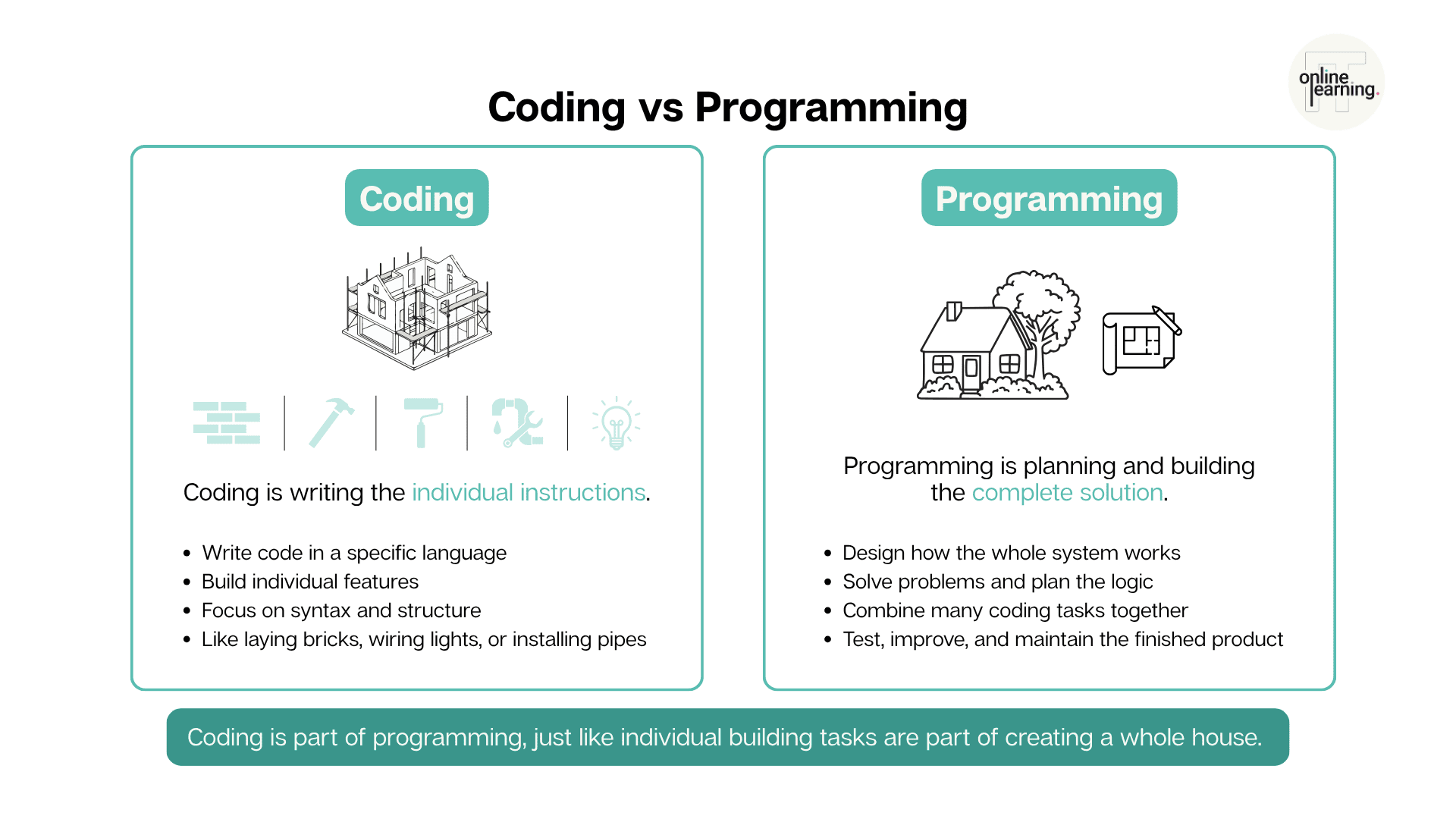
The terms coding and programming are often used interchangeably, especially in beginner conversations. However, there is a slight difference.
Coding usually refers to writing instructions in a particular coding language.
Programming is a broader process that can include:
- Understanding a problem.
- Planning a solution.
- Designing how a system should work.
- Writing the code.
- Testing it.
- Fixing errors.
- Maintaining and improving the finished software.
Imagine that you are building a house.
Coding is similar to laying bricks, installing pipes, fitting doors, or connecting electrical wiring. Programming is the broader process of studying the plans, deciding how the different parts should work together, completing the building, testing everything, and resolving problems.
As a beginner, you don’t need to worry too much about choosing the “correct” term. When people search for coding and programming for beginners, they are usually looking for the same thing: a clear way to start building useful digital skills.
| Coding | Programming |
| Writing instructions in a coding language | Planning and creating a complete software solution |
| Focuses on syntax and individual features | Includes design, logic, testing, and maintenance |
| May involve one small part of a project | Considers how the complete system works |
| An essential part of programming | A broader process that includes coding |
Coding for Beginners: Where Should You Actually Start?
For many complete beginners, web development is one of the clearest places to start.
That’s because you can see the results of your work almost immediately.
When you write HTML, text and images appear on the page. When you change the CSS, the design changes. When you add JavaScript, the page begins to respond to clicks and user actions.
This immediate feedback can make beginner coding feel more manageable and rewarding.
Start with HTML
HTML stands for HyperText Markup Language. It gives a web page its structure.
Think of HTML as the framework of a house. It defines where the rooms, doors, windows, and walls go.
On a web page, HTML identifies elements such as:
- Headings.
- Paragraphs.
- Images.
- Links.
- Forms.
- Buttons.
- Lists.
- Navigation menus.
HTML is usually easier for beginners to understand than a full programming language because its purpose is clear and visual. You write an element, open the page, and see what it created.
This is also why the Coding Diploma begins with static website development. At Level 1, learners build their foundations through HTML, CSS, Tailwind, GitHub, and practical CSS-based projects. Rather than treating HTML as an isolated topic, the Diploma helps you use it as the starting point for complete web pages and portfolio work. You can gradually see how page structure, styling, responsive design, and project organisation fit together. This is why learning HTML first can give you a useful foundation for wider web development.
Discover why learning HTML first can support your UK tech journey.
Explore the HTML & Web Essentials course.
Add CSS to Control the Design
If HTML provides the structure of a house, CSS is the interior design.
CSS controls how the website looks. It can change:
- Colours.
- Fonts.
- Spacing.
- Borders.
- Page layouts.
- Button styles.
- Image sizes.
- How the page adapts to mobile devices.
You can use CSS to turn a basic page into something that looks professional and easy to use.
As you progress, you may also encounter tools such as Tailwind CSS. Tailwind provides reusable styling options that can help developers build consistent website designs more efficiently.
You don’t need to master every CSS feature immediately. Start by learning how to change simple styles and then gradually explore layouts, responsive design, Flexbox, and Grid.
Understand the differences between Flexbox and Grid in web development.
Use JavaScript to Add Interactivity
JavaScript brings the website to life.
If HTML is the structure and CSS is the decoration, JavaScript is the electricity, plumbing, switches, and moving parts.
JavaScript can make a website:
- Open a menu.
- Display a message.
- Validate a form.
- Update information without reloading the page.
- Respond to clicks.
- Create animations.
- Perform calculations.
- Retrieve information from another system.
This is often the stage where beginners begin to feel that they are “properly coding”. You move from creating static pages to giving the browser instructions and making decisions based on user actions.
Build Small Projects from the Beginning
Don’t wait until you feel completely confident before attempting a project.
Projects are how you turn individual lessons into usable skills.
Beginner project ideas include:
- A personal profile page.
- A simple online CV.
- A landing page for an imaginary business.
- A quiz.
- A calculator.
- A to-do list.
- A weather dashboard.
- A product page.
- A simple booking form.
Practical work is built into the BCS Tech10 Coding Diploma from the beginning. Rather than only watching coding demonstrations or completing theory-based lessons, learners work through more than 50 hands-on mini-projects. These smaller exercises help you practise individual skills before applying them within larger pieces of work. The Coding Diploma includes more than 50 mini-projects and four larger portfolio projects, helping you practise new skills and build visible evidence of what you can do.
This is especially valuable for beginners because it replaces the question, “Have I practised enough?” with something much clearer:
“What have I actually built?”
Your first project doesn’t need to be original or technically impressive. Its purpose is to help you combine what you’ve learned and identify what you need to practise next.
How to Learn Coding Without Becoming Overwhelmed
Learning coding can feel overwhelming when you try to understand too many languages and tools at once.
A search for “how can I learn computer coding?” might lead you to tutorials about Python, Java, JavaScript, C#, PHP, React, SQL, GitHub, cloud computing, artificial intelligence, and dozens of other topics.
The solution isn’t to learn everything. It’s to follow a clear sequence.
This is one of the main reasons some beginners choose a structured Coding Diploma instead of relying entirely on individual tutorials.
The Diploma has already organised the journey into four progressive levels:
- Static website development.
- Front-end development.
- Back-end development.
- Cloud development.
Each level builds on the one before it. You are not expected to jump from a basic HTML tutorial straight into an advanced framework or work out whether databases, GitHub, cloud computing, or JavaScript should come next.
The pathway removes much of that guesswork while still allowing you to study flexibly and progress at your own pace.
Choose One Learning Path
Choose a starting route based on what you want to build.
For example:
- Choose web development if you want to build websites and browser-based applications.
- Choose Python if you’re interested in automation, data, or back-end development.
- Choose mobile development if you want to create smartphone applications.
- Choose game development if you’re interested in interactive games and graphics.
For many beginners, web development offers the most immediate and visible introduction because HTML, CSS, and JavaScript work together in a way that is easy to observe.
Study One Concept at a Time
Avoid jumping between several unrelated tutorials.
A clearer order might be:
- Create a page using HTML.
- Style it using CSS.
- Make it responsive.
- Add one JavaScript feature.
- Save the project using Git.
- Publish it through GitHub.
- Improve it based on feedback.
Each step builds on the previous one.
Practise More Than You Watch
Watching someone else code can help you understand a concept, but watching alone won’t build confidence.
Try to pause tutorials and recreate the example yourself. Then change something.
For example:
- Change the heading.
- Add another image.
- Alter the colours.
- Add an extra button.
- Break the code deliberately and try to fix it.
- Rebuild the feature without following the video.
Independent practice is important, but that doesn’t mean you have to solve every problem alone.
Coding Diploma learners receive access to qualified human tutors who can provide personalised feedback and help them understand difficult parts of their code. If you are stuck on a problem, a tutor can work through it with you, explain why the issue occurred, and help you develop better coding habits.
Learners also have access to an AI Tutor Bot for additional support while studying. This can be useful when you need help understanding a concept, reviewing a lesson, or working through a problem outside a scheduled tutor session.
The aim is to move from “I recognise this” to “I can use this”.
Keep a Record of Your Progress
Save your exercises and projects instead of deleting them when they are finished.
Looking back at your earlier work can show you how much you’ve improved. These projects may also become the foundations of a GitHub portfolio later.
A simple learning record could include:
- What you studied.
- What you built.
- What went wrong.
- How you fixed it.
- What you want to practise next.
A Step-by-Step Beginner Roadmap to Start a Career in Coding
A career in coding for beginners normally starts with foundational skills, practical experience, and evidence of what you can build.
You don’t need to know every coding language before applying for your first role. However, you do need a coherent set of skills and a portfolio that demonstrates how you use them.
Step 1: Learn Core Web Foundations
Start with HTML and CSS.
HTML teaches you how digital content is structured, while CSS teaches you how that content is presented.
At this stage, focus on:
- Semantic HTML.
- Page structure.
- Links and navigation.
- Images and media.
- Forms.
- CSS selectors.
- Colours and typography.
- Spacing and positioning.
- Responsive layouts.
- Flexbox and Grid.
- Tailwind CSS.
Try to complete at least one full website project rather than limiting yourself to disconnected exercises.
The website doesn’t need advanced features. A well-structured, responsive site can already demonstrate useful beginner skills.
Step 2: Add Interactivity with JavaScript and React
Once you understand how a web page is structured and styled, begin learning JavaScript.
Start with concepts such as:
- Variables.
- Data types.
- Functions.
- Conditions.
- Loops.
- Arrays.
- Objects.
- Events.
- The Document Object Model, often called the DOM.
The DOM is the browser’s representation of the web page. JavaScript can use it to change content, respond to user actions, and update elements.
After developing confidence with JavaScript, you can progress to React.
React is used to build interfaces from reusable components. For example, instead of manually recreating the same product card several times, a developer can create one product-card component and reuse it with different information.
React makes more sense when you already understand HTML, CSS, and JavaScript, so there’s no need to rush into it during your first week.
Step 3: Understand the Engine Room
Front-end development covers the parts of a website or application that the user sees and interacts with.
Back-end development covers the systems working behind the scenes.
Think of a restaurant.
The front end is the dining area, menu, tables, and waiter. It’s the part the customer experiences.
The back end is the kitchen, stockroom, order process, and preparation system. Customers may not see it, but it’s essential to delivering the service.
Back-end coding can be responsible for:
- User accounts.
- Passwords and authentication.
- Saving information.
- Processing orders.
- Retrieving records.
- Connecting to external services.
- Applying business rules.
You may use a language like Python, PHP, or C# for back-end development, depending on the pathway and system.
You will also need to understand databases. A database stores organised information, such as customer details, products, transactions, or appointments.
SQL is commonly used to work with database information. It can help you add, find, update, and organise records.
Step 4: Build a Real GitHub Portfolio
Learning how to write code is important, but employers also need evidence that you can apply it.
Git and GitHub help you record, manage, and present your work:
Think of Git as the change history in a document. It helps you see what changed, when it changed, and return to an earlier version when necessary.
GitHub is more like an online project library. It allows other people to view your code, project history, and supporting documentation.
A beginner GitHub portfolio could include:
- A responsive static website.
- A CSS or Tailwind project.
- A JavaScript application.
- A React application.
- A back-end or database project.
- Clear project descriptions.
- Instructions explaining how each project works.
Avoid uploading unfinished tutorial copies without explanation. Try to customise each project and describe what you built, which tools you used, and what problems you solved.
The Coding Diploma is designed to help you build this evidence as part of your learning rather than leaving you to create a portfolio afterwards. Its four major projects are developed directly through GitHub and cover static website development, CSS and Tailwind, JavaScript, and React.js. This gives you several different examples of your work to organise, improve, and present.
Alongside these larger projects, the programme includes more than 50 mini-projects that help you practise individual coding skills.
By the time you reach the later stages of the Diploma, your GitHub profile should tell a much clearer story than a collection of copied tutorial exercises. It can show how your skills have developed from basic page structure through to more interactive and technically advanced work.
Learn how to manage and publish your work with the Git & GitHub course.
Step 5: Get Certified and Become Job-Ready
A portfolio shows what you can build. A recognised qualification can provide additional evidence that you have followed a structured learning pathway and met defined assessment requirements.
To become job-ready for coding roles, you should aim to develop:
- Strong foundational coding knowledge.
- Practical project experience.
- A professional GitHub portfolio.
- An understanding of development tools.
- The ability to explain your decisions.
- Problem-solving examples.
- A targeted CV and LinkedIn profile.
- Confidence discussing your projects in interviews.
The first six points are primarily about developing your coding ability. The final two are about turning those skills into a credible job application.
This is where the Coding Career Programme goes further than the standalone Diploma.
The Career Programme includes the BCS Tech10-accredited Coding Diploma, structured project work, one-to-one tutoring, a Personal Study Coach, the CodeQuest gamified learning platform, AI for Coding, and portfolio development.
It then adds dedicated recruitment support to help you move from learning to applying. This includes:
- A professional CV and LinkedIn review.
- Interview preparation.
- Guidance on job-search strategies.
- Help presenting your projects and new coding skills.
- Job application assistance.
- Support from recruitment specialists.
The programme is intended for beginners and career changers whose main goal is to move into professional coding work, rather than simply learn coding as a personal or development skill.
Being job-ready doesn’t mean knowing everything.
Junior developers are still expected to learn. Employers are more likely to look for evidence that you understand the foundations, can complete practical tasks, respond to feedback, and explain how you approached a problem.
Which Coding Language Should Beginners Learn First?
There is no single coding language that every beginner must learn first. The best starting language depends on what you want to create.
| Language or technology | What it is commonly used for | Why beginners may choose it |
| HTML | Structuring websites | Easy to connect code with visible results |
| CSS | Designing websites | Lets you experiment visually |
| JavaScript | Interactive websites and web applications | Works directly in the browser |
| Python | Automation, back-end development, and data tasks | Known for relatively readable syntax |
| SQL | Working with databases | Useful across many technology roles |
| C# | Applications, games, and Microsoft environments | Useful for structured application development |
| PHP | Back-end web development | Widely associated with server-side websites |
For a general web development pathway, a sensible order is HTML, CSS, JavaScript, React, back-end development, and SQL.
Learning several languages at once can slow you down. It is usually better to become comfortable with one pathway and then add further technologies as your projects require them.
How Long Does It Take to Learn Coding?
There is no universal timeframe for learning how to code.
Your progress will depend on:
- How often you study.
- How much time you spend practising.
- Whether you follow a structured pathway.
- The complexity of the skills you want to learn.
- Whether you receive feedback and support.
- How many projects you complete.
- The type of role you eventually want.
You may be able to create a simple web page very quickly. Becoming confident enough to plan, build, test, and explain several complete projects will take longer.
Instead of asking, “How long until I know coding?”, it can be more useful to track practical milestones:
- Can I build a structured HTML page?
- Can I create a responsive layout?
- Can I add JavaScript interactivity?
- Can I identify and fix basic errors?
- Can I save and manage my work with Git?
- Can I publish projects on GitHub?
- Can I explain how one of my projects works?
- Can I build something without copying every step?
Progress in coding is easier to measure through what you can create than through the number of tutorials you have completed.
Can You Teach Yourself How to Code?
Yes, it is possible to teach yourself coding.
There is a huge range of free documentation, videos, tutorials, coding challenges, and online communities available. Self-directed learning can work particularly well for people who are organised, comfortable researching problems, and able to design their own learning pathway.
However, the availability of information creates another problem: it can be difficult to know what to study and in which order.
A beginner may complete one HTML tutorial, jump to a Python video, try a React project, read about artificial intelligence, and then start a different course without finishing anything.
The problem isn’t always a lack of content. It’s a lack of structure.
Self-Taught Coding vs Structured Coding Training
Both self-taught learning and structured training can help you learn coding. The right approach depends on your goals, learning style, budget, and level of support required.
The key difference is not simply whether the learning is free or paid. It is how much of the journey you are expected to organise for yourself.
With a fully self-directed route, you must decide:
- Which subjects to study.
- Which order to study them in.
- Which projects are worth completing.
- Whether your code is correct.
- How to turn exercises into a portfolio.
- When you are ready to move forward.
- How to prove your skills to an employer.
A structured Diploma provides an existing curriculum, practical milestones, assessments, tutor feedback, and a recognised end qualification.
For a beginner who already feels overwhelmed, that structure may be the most valuable part of the programme.
| Self-taught route | Structured Coding Diploma |
| You choose your own learning resources | The curriculum follows an organised pathway |
| Can begin with free materials | Usually requires a financial investment |
| Highly flexible | Flexible, but with clearer milestones |
| You decide what to study next | Skills progress from foundation to advanced levels |
| Feedback may be limited | Tutor feedback may be available |
| Easy to move between unrelated topics | Helps reduce gaps and repetition |
| You create your own projects | Practical projects can be built into the programme |
| You assess your own readiness | Formal assessments and accreditation can provide validation |
Self-teaching may suit you when you want to explore coding as a hobby or test whether you enjoy it.
A structured diploma may be more appropriate when you want:
- A complete learning sequence.
- Tutor guidance.
- Defined projects and assessments.
- A recognised qualification.
- Accountability and study support.
- A portfolio-focused pathway.
- Broader preparation for professional coding roles.
The two approaches don’t have to be completely separate. Many learners use free exercises and documentation alongside a structured programme to reinforce their knowledge.
How the ITonlinelearning Coding Diploma Supports Beginners
The ITonlinelearning Coding Diploma is designed to take away much of the guesswork that can make beginner coding feel overwhelming.
You don’t need to build your own curriculum from disconnected tutorials or decide which technology should come next. The learning journey has already been organised into four progressive levels, beginning with basic website development and moving towards front-end, back-end, cloud, and AI-supported coding skills.
A Clear Four-Level Learning Path
The Diploma guides you through:
- Level 1 – Static Website Development: HTML, CSS, Tailwind, GitHub, and CSS-based projects.
- Level 2 – Front-End Development: JavaScript, JavaScript projects, React.js, and React projects.
- Level 3 – Back-End Development: Command-line skills, Python, SQL, a practical SQL project, and your final portfolio.
- Level 4 – Cloud Development: AI for Coding, Microsoft Azure, AWS Cloud Practitioner, CodeQuest, and cloud development concepts.
This structure helps you understand how different coding skills connect rather than studying each subject in isolation.
Learn by Building, Not Only by Watching
The Diploma includes more than 50 hands-on mini-projects and four major portfolio projects.
These projects give you repeated opportunities to practise what you are learning. Instead of reaching the end of a course with only notes and completed videos, you work towards a GitHub portfolio containing practical examples of your skills.
Your major portfolio work includes:
- A static HTML and CSS website.
- A CSS project using Tailwind CSS and SASS.
- A JavaScript website project.
- A React.js project.
This is valuable because coding employers will usually want more than a statement that you have studied JavaScript or React. They need evidence that you can use those technologies to create something.
Get Support When Coding Becomes Difficult
Coding often involves getting stuck, testing solutions, and trying again. You shouldn’t expect every concept to make sense immediately.
Diploma learners receive one-to-one support from qualified human tutors. Your tutor can offer personalised feedback, help you work through coding problems, and explain where your approach could be improved.
You also receive access to an AI Tutor Bot for additional support while studying, as well as interactive walkthroughs, internal assessments, an exclusive learning manual, and the CodeQuest gamified coding platform.
Gain an Accredited Coding Qualification
The Coding Diploma is accredited through Tech10 by BCS, The Chartered Institute for IT.
This means the Diploma does more than provide a collection of individual courses. It leads to a recognised qualification that can be added to your CV alongside the practical project evidence in your GitHub portfolio.
| Coding Diploma feature | Why it matters to a beginner |
|---|---|
| Four progressive levels | You always know what you should learn next |
| No prerequisites | You can start without previous coding experience |
| BCS Tech10 accreditation | You work towards a recognised coding qualification |
| 50+ mini-projects | You regularly practise each new skill |
| Four major GitHub projects | You build practical work that can be presented to employers |
| One-to-one human tutors | You can ask for personalised help when something isn’t clear |
| AI Tutor Bot | You have access to additional study support |
| CodeQuest | You can practise through interactive and gamified coding activities |
| AI for Coding | You learn how AI tools can support modern coding work |
| AWS and Microsoft Azure | You develop introductory cloud knowledge alongside coding skills |
The Coding Diploma may be suitable when you want a structured, accredited pathway and practical portfolio development but are comfortable managing your own job search.
How the Coding Career Programme Helps You Start a Career in Coding
Learning technical skills is essential, but becoming employable also requires you to explain those skills, present your work professionally, and apply for suitable opportunities.
The ITonlinelearning Coding Career Programme combines the BCS Tech10-accredited Coding Diploma with dedicated career preparation and recruitment support.
You receive the same structured four-level learning route, practical coding experience, GitHub portfolio development, one-to-one tutoring, Personal Study Coach support, AI Tutor Bot access, CodeQuest, and AI for Coding.
The difference is what happens around your job search.
Turn Your New Coding Skills into a Stronger Application
Recruitment support includes:
- A professional CV review.
- LinkedIn profile optimisation.
- Interview preparation.
- Career guidance.
- Job-search strategy support.
- Job application assistance.
- Help presenting your portfolio and technical skills.
This can be particularly useful for career changers who may have valuable previous experience but aren’t sure how to connect it to a coding role.
For example, your previous work may already demonstrate problem-solving, customer communication, organisation, quality checking, or working under pressure. Recruitment support can help you present those transferable skills alongside your new coding qualification and portfolio.
Prepare to Discuss Your Portfolio in Interviews
Building a project and discussing it confidently are different skills.
During a coding interview, you may be asked:
- Why you chose a particular approach.
- Which difficulties you encountered.
- How you tested your work.
- What you would improve.
- Which parts you completed independently.
- How you used Git and GitHub.
- What you learned from the project.
The Career Programme includes interview preparation to help you talk through your projects, explain your decisions, and approach the recruitment process with greater confidence.
So, Coding Diploma or Coding Career Programme?
| Choose the Coding Diploma if… | Choose the Coding Career Programme if… |
|---|---|
| You want accredited coding training | You want accredited training and recruitment support |
| You want to build a GitHub portfolio | You want help presenting that portfolio to employers |
| You’re comfortable managing your own applications | You want guidance with applications and job-search strategy |
| You mainly need technical learning and tutor support | You also want CV, LinkedIn, and interview preparation |
| You may be studying for personal development or progression | Your main objective is to move into a professional coding role |
The Coding Career Programme is designed for people who want a more complete bridge from complete beginner to coding job candidate. It has no prerequisites, includes 12 months of programme access, and recommends approximately 240 hours of study over a typical six-to-eight-month learning period.
Common Beginner Coding Mistakes to Avoid
Trying to Learn Every Language
You don’t need to learn Python, JavaScript, Java, C#, PHP, and several frameworks before completing your first project.
Choose one route and build confidence before expanding.
Watching Tutorials Without Practising
Tutorials can create the feeling that you understand something because the instructor makes it look straightforward.
Test your understanding by closing the tutorial and trying to recreate the feature yourself.
Copying Code Without Understanding It
Developers regularly look at documentation and examples, so using reference material is normal.
However, you should try to understand:
- What the code does.
- Why it is needed.
- Which values can be changed.
- How it connects to the rest of the project.
- What would happen if you removed it.
Giving Up When You See an Error
Errors are normal.
An error message is information. It can tell you where the problem occurred and what the computer expected.
Read the message, check the relevant line, compare it with working examples, and test one change at a time.
Waiting Too Long to Build Projects
You don’t need to finish an entire curriculum before creating something.
Build small projects throughout your learning. They help you retain information and expose gaps that passive learning may hide.
Comparing Yourself with Experienced Developers
An experienced developer’s code may look fast and effortless because you can’t see the years of practice behind it.
Compare your current work with what you could create a month ago, not with someone who has been coding professionally for years.
How to Become Job-Ready for Coding Roles
Job-ready coding skills come from the combination of knowledge, practice, evidence, and communication.
Use the following checklist to assess your progress.
| Area | Evidence to develop |
| HTML and CSS | At least one structured, responsive website |
| JavaScript | An interactive project using functions, events, and data |
| Frameworks | A React project using reusable components |
| Back-end development | A project that processes or stores information |
| Databases | Evidence of using SQL to work with structured data |
| Git and GitHub | Regular commits and well-documented repositories |
| Portfolio | Several complete projects rather than isolated exercises |
| Problem-solving | Examples of errors or challenges you resolved |
| Communication | The ability to explain your code simply |
| Career preparation | A role-focused CV, LinkedIn profile, and interview examples |
You don’t need every box to be perfect before looking at junior vacancies. Use job descriptions to identify recurring skills and decide which gaps to address next.
Your projects should also be easy for another person to understand. Include a short README file explaining:
- What the project does.
- Why you built it.
- Which technologies you used.
- Which features are included.
- What you learned.
- What you would improve next.
This shows that you can communicate about your work as well as create it.
Key Takeaways: How to Learn to Code from Zero
Learning how to code becomes much easier when you stop trying to understand the entire technology industry at once.
Remember:
- Coding means writing instructions that a computer can understand.
- You don’t need to be a genius or have advanced maths skills to begin.
- HTML and CSS provide an accessible introduction to web development.
- JavaScript adds logic and interactivity.
- React helps you create more advanced, reusable interfaces.
- Back-end coding and databases power the systems behind an application.
- Git and GitHub help you manage your work and build a professional portfolio.
- Projects are essential because they turn knowledge into practical ability.
- A structured Diploma can provide a clearer learning sequence, feedback, accreditation, and project experience.
- A Career Programme can add recruitment preparation when your goal is to secure a coding role.
You don’t have to map out your entire career before taking the first step. Start with one page, one concept, or one small project. Once that works, improve it.
You can begin learning to code independently, but you don’t have to design the entire journey on your own.
The Coding Diploma provides a structured path from HTML and CSS through JavaScript, React, back-end development, SQL, AI for Coding, AWS, and Microsoft Azure. Along the way, you complete more than 50 mini-projects and four major GitHub portfolio projects, with support from qualified human tutors and an AI Tutor Bot. This route may suit you when you want practical, accredited coding training and the confidence of always knowing what to learn next.
The Coding Career Programme includes this same technical pathway and adds CV, LinkedIn, interview, job-search, and application support. It may be the stronger choice when your main objective is to change careers and secure your first coding opportunity.
You don’t need to arrive with coding knowledge. You only need a willingness to begin, practise consistently, and keep building.
Frequently Asked Questions About How to Code
How can I learn computer coding as a complete beginner?
Start with one clear pathway rather than attempting several languages at once. For web development, begin with HTML, move into CSS, and then add JavaScript. Complete small exercises, build projects, and save your work on GitHub as your skills develop.
How do you code if you have never done it before?
You can begin by installing a code editor, creating a basic HTML file, and opening it in a web browser. Add a heading, paragraph, image, and link. Once the page works, use CSS to style it and JavaScript to add a simple interactive feature.
What is the easiest coding language to learn?
The easiest language depends on what you want to create. HTML is often an accessible starting point for web development because you can see the results immediately. Python is also commonly considered readable for beginners, while JavaScript is essential for adding interaction to websites.
How do I learn coding for beginners step by step?
A practical sequence is:
- Learn HTML.
- Add CSS.
- Practise responsive layouts.
- Learn JavaScript fundamentals.
- Build interactive projects.
- Progress to React.
- Learn back-end and database fundamentals.
- Use Git and GitHub.
- Build a portfolio.
- Prepare for junior roles.
Can I learn how to code for free?
You can begin learning with free tutorials, documentation, videos, and coding exercises. Free resources can be useful for exploring coding or practising a particular concept. A structured programme may be more suitable when you need a complete curriculum, tutor feedback, formal assessment, accreditation, or career support.
Can I learn coding without a computer science degree?
Yes. Many practical coding skills can be developed through structured training, self-directed practice, and project work. Some specialist or highly academic roles may prefer a relevant degree, but beginner web and software development pathways can also be supported by a strong portfolio and evidence of practical ability.
Do I need to be good at maths to code?
Not for every type of coding. General web development relies heavily on logic, problem-solving, attention to detail, and structured thinking. More advanced maths may be needed for specialist fields such as scientific computing, advanced artificial intelligence, or computer graphics.
Is coding difficult for beginners?
Coding can feel difficult because the language and tools are unfamiliar. It becomes easier when you learn one concept at a time and practise it through small projects. Errors and confusion are normal parts of the process rather than signs that you cannot learn.
How long does it take to learn how to code?
You can create a basic web page relatively quickly, but becoming job-ready takes sustained practice and several complete projects. The timeframe will depend on your study schedule, prior knowledge, learning route, project experience, and the type of role you want.
How much time should I spend coding each day?
Consistency is more important than an extreme schedule. A focused study session several times per week can be more useful than studying for many hours once and then stopping for a month. Include time for both learning concepts and applying them independently.
What should my first coding project be?
Choose something small enough to complete but broad enough to combine several skills. A personal profile page, online CV, simple business landing page, quiz, calculator, or to-do list can all work well as beginner projects.
What is GitHub, and do beginners need it?
GitHub is an online platform used to store and share code projects managed with Git. Beginners don’t need it before writing their first line of code, but learning it early can help you track progress, protect your work, and gradually build a portfolio.
Is HTML really coding?
HTML is a markup language rather than a programming language because it structures content instead of applying wider programming logic. However, it remains a fundamental part of web development and is commonly included in beginner coding pathways.
Should I learn HTML or Python first?
Choose HTML first when your goal is to build websites and see visual results quickly. Choose Python when you are primarily interested in automation, data, scripting, or certain types of back-end development. Both can be valuable, but you don’t need to study them simultaneously.
Can I start a career in coding with no experience?
Yes, but you will need to create evidence of your ability. Build practical projects, publish them through GitHub, develop a coherent portfolio, and learn to explain your decisions. A qualification and recruitment support can also help you present your skills when applying for beginner roles.
What coding jobs can beginners work towards?
Depending on the skills and projects you develop, potential entry routes may include junior web developer, junior software developer, front-end developer, back-end developer, application support developer, or trainee full-stack developer. Vacancy requirements vary, so compare your portfolio with current job descriptions.
Is the Coding Diploma suitable for complete beginners?
The Coding Diploma is designed to progress from Level 1 web foundations through JavaScript, React, back-end development, databases, and cloud fundamentals. The pathway is intended to support learners from foundational coding through to more advanced practical skills.
What’s the difference between the Coding Diploma and Coding Career Programme?
The Coding Diploma focuses on structured, accredited coding education, project work, tutor support, and portfolio development. The Coding Career Programme includes the Diploma pathway and adds recruitment services such as CV and LinkedIn optimisation, interview preparation, and job-search support.
About the Reviewer
Reviewed by Emmanuel Msafiri Phiri | Senior Web, Software & AI Engineering Student Coach and Mentor
Emmanuel is a full-stack developer, software engineering mentor, and experienced technology educator with a professional background spanning web development, mobile applications, database management, software integration, and secure application development.
At ITonlinelearning, Emmanuel supports learners developing practical skills across front-end and back-end technologies, including HTML, CSS, JavaScript, Python, Java, PHP, SQL, and modern software development tools. He provides one-to-one technical guidance, project feedback, and career-focused mentorship to help aspiring developers strengthen their problem-solving skills and build professional coding portfolios.
Before joining ITonlinelearning, Emmanuel worked in software development roles within financial services and contributed to web, mobile, and e-commerce applications. He holds an Advanced Diploma in Computing and Information Systems and is continuing his studies in Computer Applications and Computer Science. His combination of hands-on development experience and learner-focused mentoring helps ensure that our coding content remains practical, technically accurate, and accessible to complete beginners.