What Is PRINCE2 Product-Based Planning?
PRINCE2 Product-Based Planning is an approach that begins by identifying and describing the products a project must deliver before determining the activities needed to create them. It uses Product Descriptions, a Product Breakdown Structure, and a Product Flow Diagram to clarify requirements and dependencies, providing a foundation for work packages, estimates, schedules, and budgets.
Instead of starting by asking what everyone needs to do, Product-Based Planning starts with a different question: What needs to exist when the work is complete?
This approach is closely connected to the PRINCE2 principle of focus on products and the Plans Practice.
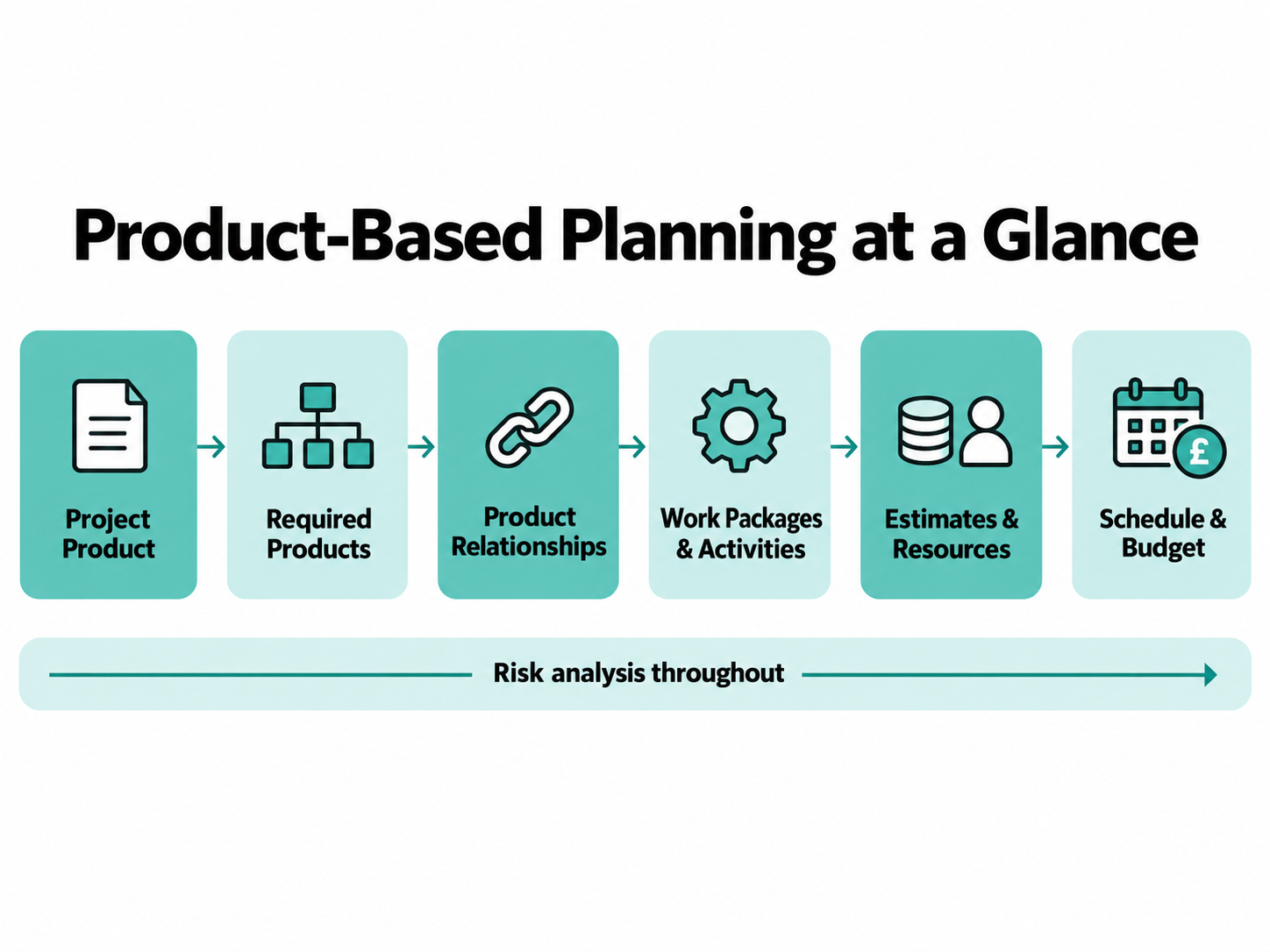
For a broader explanation of how these elements fit together, see our guide to creating a project plan using PRINCE2.
Why Does PRINCE2 Plan Around Products First?
PRINCE2 plans around products because a project needs a clear understanding of what it must deliver before the team can confidently decide how to deliver it.
Consider the difference between these questions:
- Task-first: What work should we do?
- Product-first: What must we deliver, and what work is necessary to create it?
Imagine a project to introduce an employee self-service portal.
A task-first planning discussion might begin with activities such as arranging meetings, configuring software, writing guidance, and testing the system.
These activities may all be necessary. However, they do not automatically establish whether the team has identified everything the project must deliver.
A product-first discussion begins with the intended result: a secure employee self-service portal ready for organisational use.
The team can then identify the supporting products, establish their requirements, and determine the work necessary to deliver them.
This is important because Product-Based Planning can:
- Clarify what falls within the agreed scope.
- Reduce the risk of overlooking required outputs.
- Establish quality expectations before work begins.
- Make product dependencies more visible.
- Provide a stronger basis for estimating time, resources, and costs.
- Help avoid unnecessary activities that do not contribute to agreed products.
The goal is not to eliminate tasks. It is to ensure that the tasks contribute to products the project actually needs.
This reflects the PRINCE2 principle of focusing on products.
What Is the Difference Between a Product and an Activity?
A product is something required by the project that can be defined, created or obtained, and tested. An activity is work performed to help deliver a product.
Products do not have to be physical objects. They may include documents, systems, information, or other tangible or intangible outputs.
| Product | Activity |
|---|---|
| Employee training guide | Write the employee training guide |
| Configured customer portal | Configure the customer portal |
| Approved test results | Conduct and document testing |
| Migrated employee records | Migrate and validate employee records |
| Agreed support procedure | Develop and approve the support procedure |
The distinction matters when building a Product Breakdown Structure.
For example, “write a user guide” describes work to be performed. “User guide” describes the required result.
Once the required user guide has been defined, the team can identify activities such as drafting, reviewing, revising, and approving it.
What Is the Project Product?
The Project Product represents the total output the project is intended to deliver.
It provides an overall picture of what successful delivery should produce. This may involve several connected products rather than a single physical item.
For example, a project introducing an employee self-service portal might need more than a configured platform. Its overall output could include the functioning portal, migrated data, user guidance, and arrangements for operational support.
These components contribute to the Project Product.
In PRINCE2, the overall output is described through the Project Product Description.
The Project Product should not be confused with every individual product in the project, or with the benefits expected from using those products.
What Is a Project Product Description?
A Project Product Description is a PRINCE2 management product that describes the project’s major products or outcomes, their intended purpose, the user’s quality expectations, and the criteria and methods used to confirm acceptance.
It establishes what the overall project must achieve from a product-delivery perspective.
The Project Product Description is initially created during Starting Up a Project and refined during Initiating a Project.
Its information addresses:
- The intended purpose and users of the project products.
- The major products to be delivered.
- What those products are derived from or based on.
- The user’s quality expectations.
- Acceptance criteria.
- Acceptance methods and responsibilities.
- Relevant project-level quality tolerances.
The precise requirements will depend on the project.
Example: Employee self-service portal
The Project Product Description might establish that employees must be able to securely access selected HR information through a new portal.
It could specify that acceptance requires the agreed functionality to operate correctly, applicable security requirements to be satisfied, and authorised representatives to confirm that the completed solution meets the stated acceptance criteria.
The important point is that the Project Product Description establishes a clear destination for the planning work.
Without it, different stakeholders may assume that different products or capabilities are included in the finished solution.
You can learn more about the purpose of such documentation in our guide to PRINCE2 management products.
What Is a Product Breakdown Structure in PRINCE2?
A Product Breakdown Structure (PBS) is a hierarchical representation of the products to be produced within the scope of a Plan.
It shows how larger products can be divided into smaller component products.
The Product Breakdown Structure answers:
What products are required?
It does not, by itself, establish the order in which those products must be created.
For an employee self-service portal project, an illustrative structure might include:
Project Product: Employee Self-Service Portal Ready for Use
- Configured platform
- Migrated employee data
- Tested solution
- User guidance
- Training materials
- Operational support process
- Launch communications
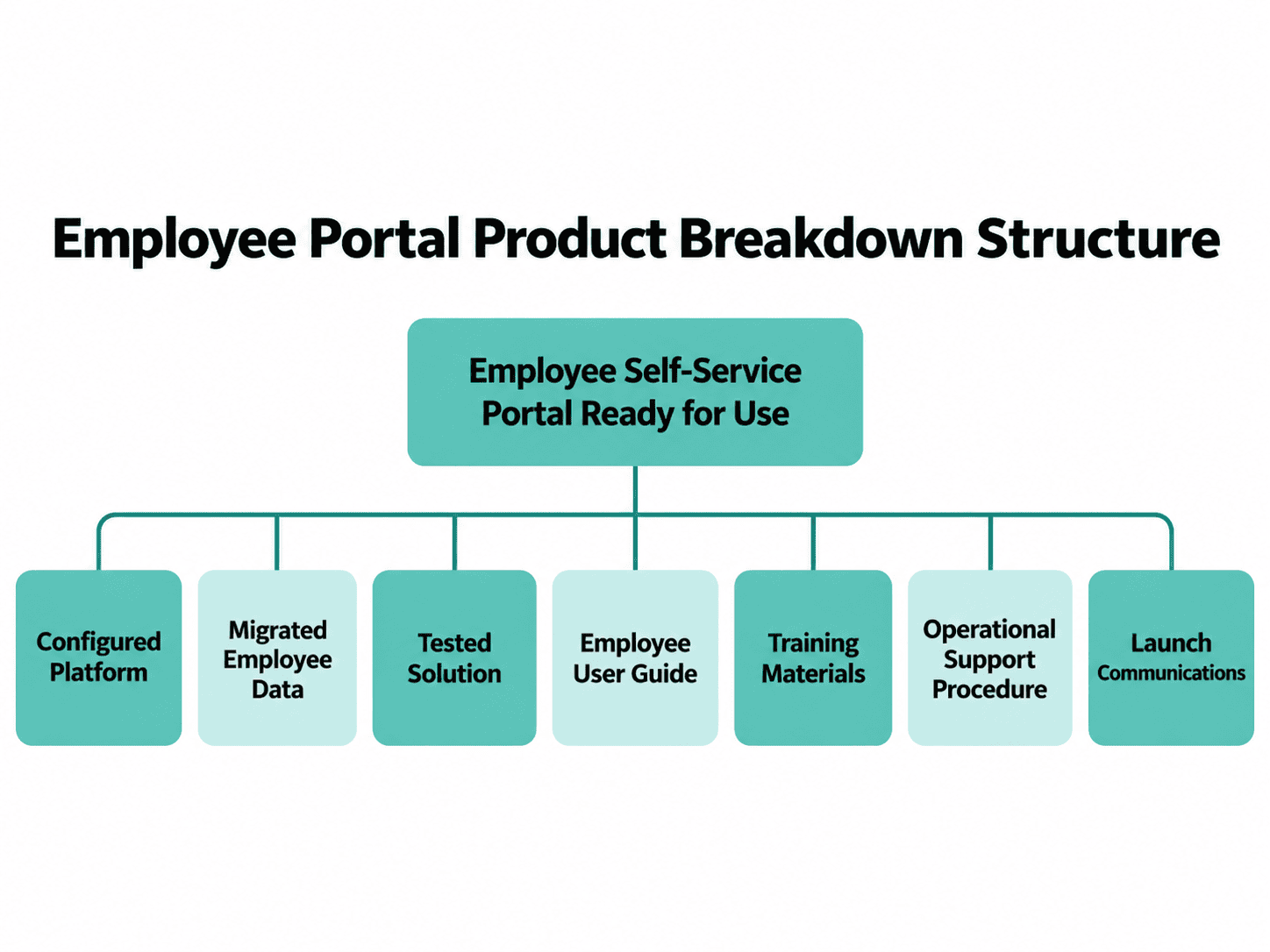
Some products may be broken down further. For example, the configured platform could include access controls, employee profile functionality, and approved configuration settings.
The appropriate level of detail depends on the project’s complexity, delivery method, and planning needs.
A Product Breakdown Structure may also identify external products on which the project depends.
What Is a Product Description in PRINCE2?
A Product Description explains the requirements for an individual product, providing information needed to develop, verify, and manage that product.
Product Descriptions translate broader requirements into a clearer understanding of what individual products must contain and how their quality will be assessed.
This may involve information about:
- The product’s purpose and intended use.
- Its required components and characteristics.
- Relevant source materials or existing products.
- Applicable quality criteria and standards.
- How product quality will be checked.
- Responsibilities relating to development, review, and approval.
The requirements should be sufficiently clear to support realistic planning and quality control.
Example: Employee User Guide
An original, simplified Product Description might establish:
- Purpose: Help employees use the new self-service portal.
- Users: Employees accessing their HR information.
- Content: Login instructions, profile updates, common tasks, and support contacts.
- Quality criteria: Instructions are accurate, accessible, and consistent with the approved portal configuration.
- Quality checks: Review by the HR and technical representatives responsible for the relevant content.
- Approval: Authorised user representative confirms the guide is suitable for release.
*This is an illustrative learning example, not an official PRINCE2 Product Description template.
Why Write Product Descriptions Before Building the Schedule?
Product Descriptions help planners understand the work that must actually be performed.
Consider the instruction “prepare training materials”.
Without a clearer description, the team might not know whether the materials require written instructions, screenshots, accessibility checks, management approval, or multiple language versions.
Each requirement can affect effort, resources, and delivery time.
By clarifying the product first, planners have a stronger basis for identifying the necessary activities and estimating the work.
The level of detail should remain appropriate to the delivery method. In iterative-incremental projects, detailed requirements may be refined as products are developed.
What Is a Product Flow Diagram?
A Product Flow Diagram shows the sequence and dependencies between products.
It helps identify which products must be available before other products can be completed and where work may proceed in parallel.
The Product Flow Diagram answers:
What needs to exist before another product can be delivered?
Consider the employee portal example.
The configured platform and migrated employee data may be developed through separate workstreams.
Both may be required before the integrated solution can be fully tested.
Meanwhile, user guidance may be prepared using an approved configuration and then finalised after testing.
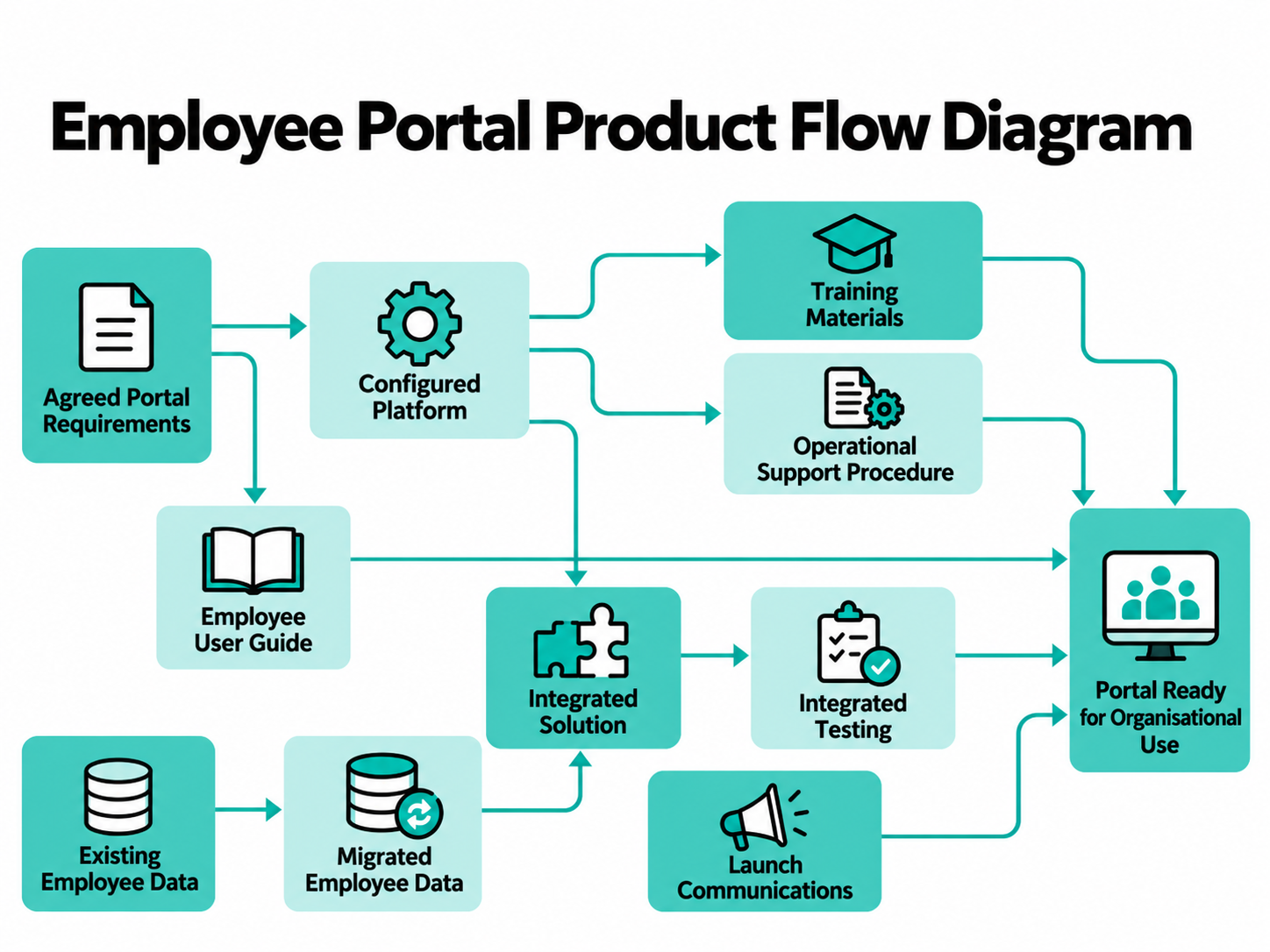
These relationships influence the order in which work should happen.
A Product Flow Diagram is not the same as a project schedule.
It identifies product dependencies and sequence, whereas a schedule adds information about activities, durations, resources, and timing.
Product Breakdown Structure vs Product Flow Diagram: What’s the Difference?
The Product Breakdown Structure identifies the products required by the Plan and shows their hierarchy. The Product Flow Diagram identifies the relationships and dependencies between those products.
| Question | Product Breakdown Structure | Product Flow Diagram |
|---|---|---|
| Main purpose | Identify and organise required products | Show product sequencing and dependencies |
| Central question | What products are needed? | What must exist before something else? |
| Visual structure | Hierarchy and component relationships | Directional relationships and flows |
| Useful for | Clarifying required products and scope | Identifying dependencies and informing scheduling |
| Does it show activity duration? | No | No |
Both can support the wider planning process, but neither replaces the detailed schedule.
What Are the Steps in PRINCE2 Product-Based Planning?
The product-definition element of the PRINCE2 planning technique contains four steps:
- Write the Project Product Description.
- Create a Product Breakdown Structure.
- Write Product Descriptions.
- Create a Product Flow Diagram.
These steps form the starting point for the wider planning technique.
The Project Product Description step applies to the Project Plan. The remaining product-definition activities can support the relevant products at other planning levels.
Step 1: Write the Project Product Description
Begin by establishing the project’s overall products or outcomes and their intended purpose.
Clarify user expectations, acceptance requirements, and how acceptance will be confirmed.
For the employee portal project, this means agreeing on what a ready-for-use portal must provide, rather than beginning with an unstructured list of technical tasks.
Result: A shared understanding of the overall project output and its acceptance requirements.
Step 2: Create a Product Breakdown Structure
Identify the products needed to deliver the agreed Project Product.
Break larger products into relevant components and consider whether external products are necessary.
For the employee portal, the structure might include the configured platform, migrated data, tested solution, guidance, and operational support arrangements.
Result: A hierarchy of the required products.
Step 3: Write Product Descriptions
Define the requirements for the relevant individual products.
Consider the intended users, quality expectations, product characteristics, and information needed to develop and verify each product.
Subject matter experts and user representatives may need to contribute.
Result: Product requirements that can support development, quality management, estimating, and scheduling.
Step 4: Create a Product Flow Diagram
Establish how the products relate to and depend on one another.
Identify products that must be available before others can be completed, alongside products that can be developed in parallel.
Include relevant dependencies involving external products.
Result: A clearer understanding of product sequence and dependencies, which can inform the work packages and schedule.
These four steps may be revisited as the project becomes better understood. Product-Based Planning should not be treated as a one-time activity that can never change.
How Does Product-Based Planning Become a Project Plan?
Defining products is the foundation of the PRINCE2 planning technique, but it is not the entire process.
The wider technique connects the required products to work packages, activities, estimates, schedules, budgets, and ongoing risk analysis.
Organise the Work Packages
Once the products and their dependencies are understood, the project team can identify the work required to create them.
Related delivery activities, people, and resources are organised into Work Packages.
A Work Package Description establishes the work to be delivered and the arrangements for managing it.
For example, a data-migration work package might include activities such as preparing existing data, mapping fields, performing test migrations, completing the migration, and validating the results.
The Work Package Description and Product Description are different.
- The Product Description explains what an individual product must be like.
- The Work Package Description explains how responsibility for producing and delivering the relevant products is organised and controlled.
Prepare Estimates and Resources
Product requirements and delivery activities help the team estimate the people, skills, resources, time, and costs needed.
PRINCE2 recognises several estimating approaches, including top-down, bottom-up, comparative, parametric, data analytics, and subject matter expertise.
The most appropriate estimating approach depends on what is known about the products, the available evidence, and the project context.
For example, the team may estimate how much specialist time is needed for data migration, how long testing might take, and which facilities or systems must be available.
It is also useful to consider the confidence associated with the estimates.
Develop the Schedule and Budget
The schedule translates the planned work into a representation of activities, durations, sequencing, and resource requirements.
Dependencies identified through Product-Based Planning influence which activities can begin and when.
For example, integrated testing cannot be completed until the relevant system components and data are available.
Some work may proceed in parallel, while other activities must happen in sequence.
The budget is then prepared using the estimated costs associated with delivery and management work, alongside the relevant provisions for risk, change, and tolerances.
Analyse Risks and Document the Plan
Risk analysis is performed throughout the PRINCE2 planning technique.
Risks may become apparent when defining products, identifying external dependencies, organising work packages, estimating effort, or preparing the schedule.
For example, the employee portal project may depend on an external provider delivering an approved integration component.
If that component is delayed, the project’s schedule could be affected.
The risk should be identified and managed through the project’s risk management arrangements.
The completed planning information is then documented and maintained in a form appropriate to the project.
This may involve a combination of documents, spreadsheets, diagrams, and project management systems rather than one large document.
For more guidance, read our PRINCE2 risk management guide.
How Is Product-Based Planning Used Across Different Plans?
Product-Based Planning supports the different levels of planning used in PRINCE2.
| Plan | How Product-Based Planning helps |
|---|---|
| Project Plan | Establishes the major products and overall delivery approach |
| Stage Plan | Provides a more detailed view of products and work within an individual stage |
| Team Plan | Can support detailed planning of the products and tasks allocated to a team |
| Exception Plan | Helps establish a revised delivery approach when an exception requires replanning |
The Project Plan provides the high-level picture of how the project will deliver its objectives.
Stage Plans contain more detailed information for the period being managed.
Team Plans may be developed where needed to help teams organise their work.
Exception Plans replace an affected Plan, or part of it, following the relevant exception decision.
The detail in these Plans should remain consistent with the approved scope and appropriate to the planning horizon.
For more context, explore how PRINCE2 project stages work.
How Does Product-Based Planning Support Scope and Quality?
Product-Based Planning supports scope management by making the required products explicit.
When the products are defined and agreed, the project team has a clearer basis for identifying what is included in the work.
Imagine that a stakeholder requests an additional reporting dashboard after the employee portal project has been planned.
The team can compare that request with the agreed products and their descriptions.
If the dashboard represents additional scope, its impact on other products, activities, costs, timescales, and project justification can be assessed through the project’s issue and change-control arrangements.
Product-Based Planning does not prevent every request for additional scope. It helps make those requests more visible and easier to evaluate.
Read more in how PRINCE2 helps manage scope creep.
Product-Based Planning also supports quality.
The Project Product Description establishes overall quality expectations and acceptance criteria, while individual Product Descriptions help clarify the requirements that particular products must satisfy.
This means quality expectations can influence how the products are developed, reviewed, tested, and accepted.
However, describing quality requirements does not guarantee that the resulting products will meet them. The appropriate quality-control activities must still be performed.
Product-Based Planning Example: Employee Self-Service Portal
Let’s bring the different elements together using one fictional project.
An organisation wants employees to access selected HR information through a secure online portal instead of relying entirely on manual requests.
The project team must decide what to deliver before building a detailed activity schedule.
Step 1: Define the Project Product
Project Product: Employee self-service portal ready for organisational use.
The intended output includes the agreed portal functionality, the supporting information needed for its operation, and the arrangements necessary for employees to begin using it.
An illustrative acceptance summary might include successful completion of specified functional and security testing, authorised acceptance of the solution, and availability of agreed user-support materials.
These are example project requirements, not mandatory PRINCE2 acceptance criteria.
Step 2: Identify the Required Products
The team identifies the following products:
| Product | Intended contribution |
|---|---|
| Agreed portal requirements | Establish the required capabilities |
| Configured platform | Provide the approved portal functionality |
| Migrated employee data | Make the relevant information available |
| Tested integrated solution | Demonstrate that the combined solution meets its specified requirements |
| Employee user guide | Support employees using the portal |
| Training materials | Support adoption of the new system |
| Operational support procedure | Establish how support requests will be handled |
| Launch communications | Inform employees about the portal and its introduction |
This is a simplified breakdown. A real project may need additional products, different groupings, or further levels of decomposition.
Step 3: Describe the Products
Consider the employee user guide.
The team agrees that it must explain how employees sign in, access information, complete the agreed self-service tasks, and request assistance.
The guide must reflect the approved portal functionality and undergo appropriate review before release.
This gives the delivery team a clearer understanding of the required output.
Step 4: Map Product Dependencies
The team then identifies how the products relate.
The agreed requirements inform the platform configuration.
Data preparation and platform configuration can progress through separate workstreams, but the integrated solution depends on both.
The integrated solution must be tested before final acceptance.
User guidance and training materials may be developed in parallel with configuration and testing, with final updates made before launch.
Step 5: Identify Activities and Build the Schedule
Having established the products and dependencies, the team can organise the required activities into Work Packages.
For the migrated employee data product, this could include:
- Assessing and cleaning existing data.
- Mapping the source and target fields.
- Performing a test migration.
- Reviewing and resolving errors.
- Completing the agreed migration.
- Validating the results.
The required skills, effort, resources, and durations can then be estimated.
The team can prepare a schedule that reflects the dependencies between configuration, migration, testing, guidance, and operational readiness.
The key lesson is that the activity schedule follows from the required outputs rather than defining the outputs by itself.
Product-Based Planning vs Task-Based Planning
Product-Based Planning and task-based planning focus on different starting points.
| Question | Task-first approach | Product-Based Planning |
|---|---|---|
| Starting point | Activities to perform | Products to deliver |
| Initial question | What needs doing? | What needs to exist? |
| Main early output | Activity list | Defined products and relationships |
| Next consideration | How activities should be organised | How the products should be created |
| Main potential weakness | Required outputs may remain unclear | Product definitions may become unnecessarily detailed if poorly tailored |
A task-first approach is not automatically ineffective.
However, PRINCE2 emphasises establishing the required products so that the activities have a clear purpose and the scope can be understood.
Common Product-Based Planning Mistakes
Several common mistakes can reduce the usefulness of Product-Based Planning.
Confusing products with activities. “Configure the platform” is work. “Configured platform” is the product that work should produce.
Treating the Product Breakdown Structure as a schedule. A hierarchy of products does not establish when they will be delivered.
Ignoring external dependencies. An externally supplied product may affect the project even when the project manager does not control its delivery.
Leaving product requirements vague. Unclear product requirements make estimating, quality control, and acceptance more difficult.
Adding products without checking scope. Additional products may require formal assessment of their impact on the approved Plan.
Creating unnecessary detail. A simple project may not need the same degree of product decomposition as a complex project.
Assuming all work must be sequential. Some products can be created concurrently, while others have clear dependencies.
The solution is to keep product requirements clear, maintain the links between products and work, and tailor planning to the project.
Can Product-Based Planning Work With Agile or Hybrid Delivery?
Yes. Product-Based Planning can support projects using linear-sequential, iterative-incremental, or hybrid delivery methods.
PRINCE2 does not require every product to be fully specified before any development work begins.
In an iterative-incremental project, requirements may evolve alongside the products being developed.
The delivery team may use product backlogs, epics, features, and user stories to describe the required outputs and organise work.
The essential principle remains that the project should maintain a clear understanding of the products and the value they are intended to deliver.
For example, the employee portal might initially provide a limited set of employee self-service functions.
Additional capabilities could then be developed incrementally, with the scope of each stage or iteration agreed and controlled appropriately.
This does not mean Product-Based Planning is identical to backlog management. It means PRINCE2 can accommodate different approaches to defining and delivering products.
See Is PRINCE2 Waterfall? for a closer look at delivery methods.
How Should Product-Based Planning Be Tailored?
The level of detail used in Product-Based Planning should reflect the project’s context, complexity, delivery method, and risks.
For a small project, a concise Project Product Description and relatively simple planning information may provide sufficient clarity.
For a larger project, more detailed Product Descriptions, component breakdowns, dependency relationships, and work-package arrangements may be needed.
The goal is to provide enough detail to support effective decisions without creating unnecessary administration.
PRINCE2 also permits an alternative planning procedure when this is appropriate and documented through the project’s tailoring arrangements.
The important point is to preserve the product focus and the necessary planning and control information.
Learn more in how to tailor PRINCE2.
Do You Need Special Software for Product-Based Planning?
No. PRINCE2 does not require a particular software application to perform Product-Based Planning.
Depending on the project’s needs, you could use a whiteboard, spreadsheet, diagramming application, or dedicated project management system.
A small project might use a simple product hierarchy and dependency diagram.
A complex project with many products, work packages, and changing dependencies may benefit from specialised planning tools.
The software should support the planning process, rather than determine how the project is managed.
PRINCE2 Product-Based Planning Checklist
Use this checklist when beginning or reviewing your planning work.
- Have we defined the overall Project Product?
- Are the major products or outcomes clearly understood?
- Have we established relevant acceptance expectations?
- Have we identified the products required within the Plan?
- Are products distinguished from activities?
- Are the Product Descriptions sufficiently clear?
- Have we considered quality requirements?
- Are internal and external dependencies understood?
- Does the Product Flow Diagram reflect the required product sequence?
- Have the relevant delivery activities been identified?
- Are the Work Packages consistent with the products and approved scope?
- Have people, resources, durations, and costs been estimated?
- Does the schedule reflect the dependencies?
- Have we considered risks throughout planning?
- Is the planning detail appropriate to the project context?
Frequently Asked Questions
What is Product-Based Planning in PRINCE2?
Product-Based Planning is an approach that identifies the products a project needs to deliver before determining the work required to create them. It supports the PRINCE2 focus on products principle and provides a foundation for developing realistic Plans.
What are the four product-definition steps?
The four steps are writing the Project Product Description, creating a Product Breakdown Structure, writing Product Descriptions, and creating a Product Flow Diagram. These steps form the product-definition part of the wider planning technique.
What is the difference between a Product Breakdown Structure and Product Flow Diagram?
A Product Breakdown Structure shows the hierarchy of required products. A Product Flow Diagram shows their sequence and dependencies. Neither is a substitute for the detailed project schedule.
What is a Project Product Description?
A Project Product Description defines the project’s major products or outcomes, intended purpose, user quality expectations, acceptance criteria, and acceptance methods.
What is the difference between a product and an activity?
A product is a tangible or intangible input or output that can be described and tested. An activity is work performed to help produce or deliver the required products.
Does Product-Based Planning create the project schedule?
Not by itself. Product-Based Planning provides information about the required products and their relationships. The wider planning process then identifies activities, estimates, resources, and scheduling arrangements.
Can Product-Based Planning be used in Agile projects?
Yes. PRINCE2 supports iterative-incremental and hybrid delivery. Product requirements may be represented through features, epics, user stories, and backlogs where appropriate.
Is Product-Based Planning mandatory in PRINCE2?
The focus on products principle must be applied in a PRINCE2 project. However, the specific planning technique can be tailored, and an alternative organisational planning procedure may be used when its adoption is appropriately documented.
What Should You Explore Next?
Understanding Product-Based Planning is an important step towards understanding how PRINCE2 connects project requirements to practical delivery.
For a wider view of how Plans, practices, and project controls work together, explore our PRINCE2 project management guide.
If you’re preparing for a PRINCE2 qualification, learning how products, activities, and planning information connect will also help you understand the relationship between the Plans Practice and other parts of the method.
Want to understand how PRINCE2 turns project outcomes into practical plans?