Product Breakdown Structures in PRINCE2
A Product Breakdown Structure (PBS) is a hierarchy of the products that must be produced within a project plan. In PRINCE2®, it helps the project team identify and organise required outputs, including their component products, before determining the work needed to deliver them. It supports Product-Based Planning by making the scope of delivery easier to understand.
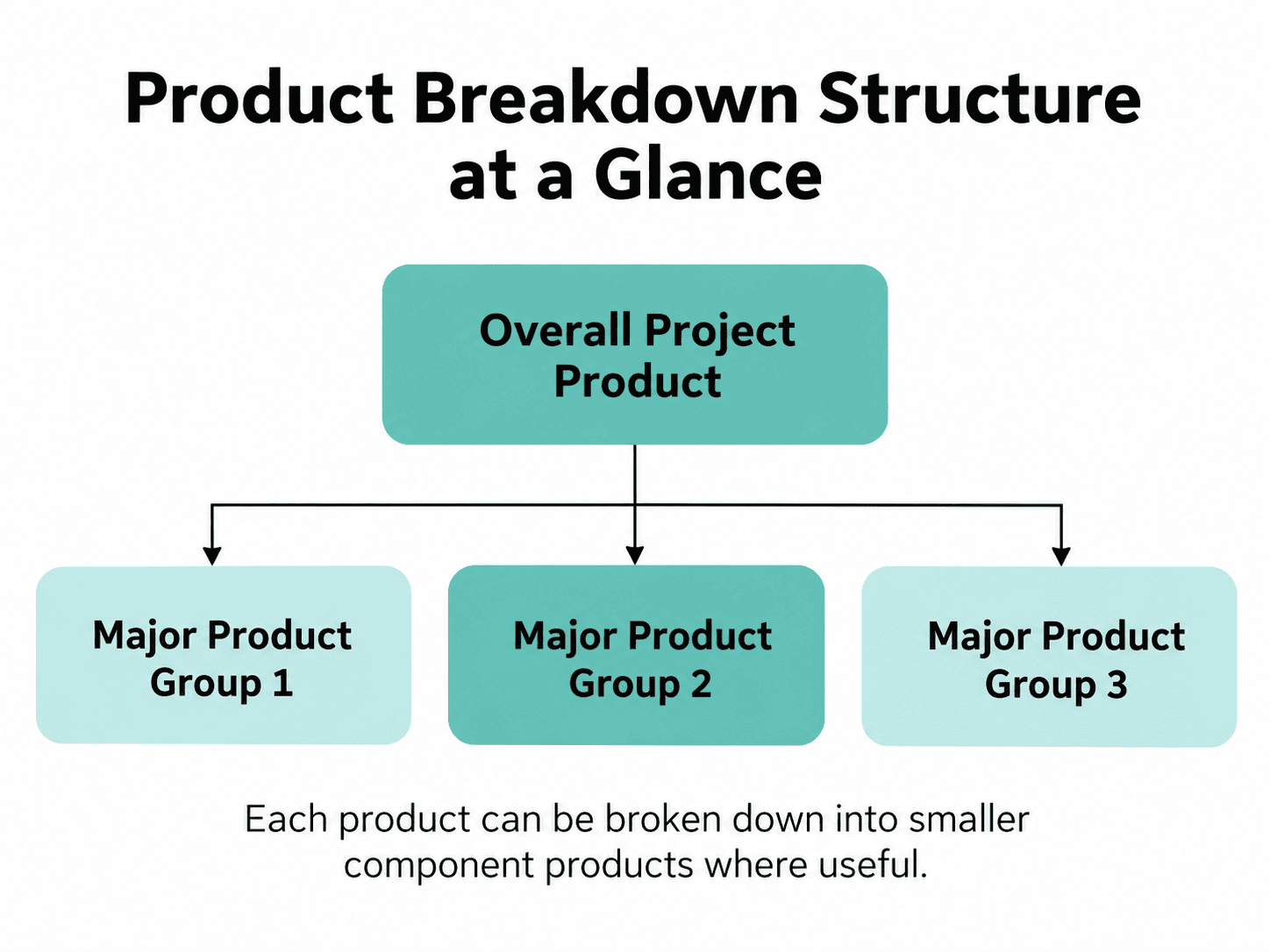
Each product can be broken down into smaller component products where useful.
A Product Breakdown Structure answers one fundamental question: What products are needed?
It doesn’t tell you the order in which activities will happen or how long they will take. Those questions are addressed through other parts of PRINCE2 planning.
For example, a Product Breakdown Structure might identify a configured employee portal and a user guide. Configuring the portal and writing the guide are activities required to create those products.
Understanding this distinction makes it easier to plan projects around tangible results rather than simply producing a long list of tasks.
What Is a Product Breakdown Structure in PRINCE2?
A Product Breakdown Structure in PRINCE2 is a hierarchical representation of the products required within the scope of a plan. It identifies the products to be delivered and shows how they can be divided into their component elements.
The technique belongs to the Plans practice and supports the PRINCE2 principle of focus on products.
Imagine that a business wants to introduce an employee self-service portal.
Instead of immediately scheduling software development, training sessions, and data migration activities, the project team first considers what must exist for the portal to be successfully delivered.
That might include:
- A configured employee portal.
- Migrated employee records.
- Tested functionality.
- User guidance.
- Operational support arrangements.
- Launch communications.
The project team can then organise these outputs into a hierarchy and identify which products need further breakdown.
This makes the structure useful for explaining the scope of delivery to stakeholders and for developing more detailed planning information.
What Does a Product Breakdown Structure Show?
A Product Breakdown Structure shows the products required by a plan and the hierarchical relationships between those products and their components.
It can help the team understand:
- The overall Project Product: What the project is intended to deliver.
- Major products: The broader deliverables that contribute to that result.
- Component products: The more detailed products required within those broader deliverables.
- Intermediate products: Outputs needed to enable other products to be created.
- Relevant external products: Products supplied outside the project’s control on which delivery depends.
The structure can also help group related requirements logically.
For example, the requirements for an employee portal’s security functionality may be closely related, while requirements for training materials may be managed separately.
The hierarchy helps make these distinctions visible before detailed work is organised.
What Does a Product Breakdown Structure Not Show?
A Product Breakdown Structure does not, by itself, provide a schedule, activity sequence, or resource plan.
It is particularly important not to confuse the hierarchy of products with the order in which they must be created.
| Information | Where it is addressed |
|---|---|
| Products required | Product Breakdown Structure |
| Product quality requirements | Product Descriptions |
| Product sequence and dependencies | Product Flow Diagram |
| Activities and work organisation | Work packages and Work Breakdown Structure |
| People and resource requirements | Estimates and wider planning information |
| Activity dates and durations | Project schedule |
For example, a Product Breakdown Structure might show that migrated employee data and a configured portal are both required.
However, it does not establish when the data migration must happen relative to the configuration work.
That relationship needs further analysis.
The PBS is a product hierarchy, not a timeline.
What Goes at the Top of a Product Breakdown Structure?
For a Project Plan, the overall Project Product provides the starting point for developing the Product Breakdown Structure.
The Project Product describes the total output the project is intended to deliver.
For example, if the project involves introducing a new employee self-service portal, the overall Project Product could be:
Employee Self-Service Portal
This is broader than an individual software component. It represents the intended overall result, which may involve technology, information, guidance, and operational readiness.
The Product Breakdown Structure then helps identify the products needed to achieve that result.
Importantly, PRINCE2 also uses Product Breakdown Structures for Stage Plans and Team Plans. Their scope may cover only part of the overall Project Product, so the hierarchy should reflect the products relevant to that particular plan.
A Project Plan and a Project Product are not the same thing.
The Project Product is the overall output. The Project Plan describes how and when the project will deliver its objectives.
How Does the Project Product Description Relate to the Product Breakdown Structure?
The Project Product Description establishes the major products or outcomes, expected quality, and acceptance arrangements for the project. The Product Breakdown Structure develops the hierarchy of products needed within the plan.
These two elements work together.
The Project Product Description helps establish what the project is expected to achieve and what will be accepted.
The Product Breakdown Structure then provides a way to organise the products that contribute to that result.
For example, an employee portal’s Project Product Description might establish that employees must be able to view personal information and submit certain requests securely.
The Product Breakdown Structure could then identify the configured portal, relevant data products, and supporting guidance required to deliver that capability.
Later, individual Product Descriptions can define specific products in greater detail.
The Project Product Description is also a PRINCE2 management product. You can explore it alongside the other baseline management products in our guide to PRINCE2 Management Products.
What Is the Difference Between a Product and an Activity?
A product is an output that can be described and assessed. An activity is work carried out to produce, review, or approve an output.
This distinction is central to Product-Based Planning.
| Product | Related activity |
|---|---|
| Configured employee portal | Configure the employee portal |
| User training guide | Write the user training guide |
| Migrated employee data | Migrate the employee data |
| Test results | Carry out testing and record the results |
| Approved launch communications | Prepare and obtain approval for launch communications |
| Support documentation | Develop the support documentation |
A useful practical test is to ask:
Can I identify what will exist when this work has been completed?
If the answer describes an action, such as “configure the system”, it is likely to be an activity.
If it describes an identifiable output, such as “configured system”, it is likely to be a product.
This isn’t a strict grammatical rule. The important distinction is between the work being performed and the output being delivered.
Where Does the Product Breakdown Structure Fit in Product-Based Planning?
The Product Breakdown Structure is part of the product-definition and analysis work within PRINCE2’s planning technique.
PRINCE2 starts planning with the products required and then considers how they will be delivered.
Within the technique, defining and analysing products involves four related steps:
- Write the Project Product Description: Establish the project’s major products or outcomes and acceptance expectations.
- Create the Product Breakdown Structure: Organise the products required by the plan into a hierarchy.
- Write Product Descriptions: Define individual products in greater detail.
- Create the Product Flow Diagram: Establish the sequence and dependencies between products.
The Project Product Description is prepared for the Project Plan. The other product-definition steps apply at the relevant level of planning.
After defining and analysing products, PRINCE2’s wider planning technique addresses work packages, estimates, scheduling, budgeting, risk analysis, and documenting the plan.
These activities are interrelated rather than always occurring in a rigid sequence.
For example, developing the schedule may reveal that additional product information is needed. Further analysis may change an estimate or expose an overlooked dependency.
The Product Breakdown Structure therefore provides an important foundation, but it is not the complete plan.
For a closer look at how the Product Breakdown Structure works alongside Product Descriptions and the Product Flow Diagram, explore our guide to Product-Based Planning in PRINCE2.
For a fuller explanation, read How to Create a Project Plan Using PRINCE2.
How Do You Create a Product Breakdown Structure?
To create a Product Breakdown Structure, start with the products that the plan must deliver, divide them into meaningful component products, and review the hierarchy for completeness.
The following five steps provide a practical way to apply the current PRINCE2 concepts. They are intended as guidance rather than a separate, officially prescribed PRINCE2 procedure.
Start With the Overall Project Product
For a Project Plan, begin by identifying what the project is intended to deliver.
Ask:
What must exist when the project has achieved its agreed objectives?
For our example, the answer is an employee self-service portal that meets the agreed requirements.
The overall product becomes the starting point for the hierarchy.
Refer to the Project Product Description to make sure your understanding reflects the agreed outcomes and acceptance expectations.
Identify the Major Products Needed
Next, identify the major products that contribute to the overall result.
For the employee portal, these could be grouped as:
- Technical Solution.
- Data.
- User Support.
- Operational Readiness.
- Launch.
These are illustrative groupings rather than prescribed PRINCE2 categories.
The purpose is to make the overall product easier to understand and organise.
Break Major Products Into Component Products
Consider whether each major product needs to be divided further.
For example, the Technical Solution could contain:
- Configured platform.
- Integrated solution.
- Tested solution.
User Support might contain:
- User guide.
- Training materials.
The aim isn’t to create as many levels as possible. Break down products where doing so helps clarify requirements, delivery responsibilities, quality expectations, or planning decisions.
Some products will need greater decomposition than others.
Check Whether Anything Important Is Missing
Review the hierarchy against the Project Product Description and the products required for acceptance.
Useful questions include:
- Are all important outputs represented?
- Is supporting documentation needed?
- Are products required for testing included?
- Does the project need training or operational support products?
- Are there external products on which delivery depends?
- Have intermediate products been overlooked?
- Does the hierarchy contain unnecessary or duplicated products?
These are practical review prompts rather than a universal list of compulsory PRINCE2 products.
For instance, a relatively simple portal might not need a separate training package if users can operate it without additional training.
The structure should reflect the actual requirements.
Check That You Have Products, Not Tasks
Review the labels in your structure.
If you find “Train staff”, ask whether a distinct product is needed, such as an agreed training package or training materials.
If you find “Configure platform”, the intended product may be the configured platform.
However, don’t force every activity into an artificial product.
Training delivery may itself be necessary work, even if there is no separate training deliverable. That activity can be considered during wider planning without being disguised as a product in the hierarchy.
The aim is to keep the PBS focused on products while making sure the wider plan still accounts for the activities needed to deliver them.
How Detailed Should a Product Breakdown Structure Be?
A Product Breakdown Structure should be detailed enough to support meaningful product definition, planning, and control, without creating unnecessary complexity.
There is no universal number of levels that every PBS must contain.
A relatively simple project may need only a small hierarchy. A complex project may require several levels to clarify technical components, requirements, or different delivery arrangements.
Too little detail can hide important products.
Too much detail can make the hierarchy difficult to understand and maintain.
The right level depends on the project, the products, and the decisions that the structure needs to support.
PRINCE2’s tailoring principle is particularly relevant here.
Product Breakdown Structure Example
A Product Breakdown Structure example is often the easiest way to see the difference between organising products and planning activities.
Let’s use a fictional project to introduce an employee self-service portal.
The intended result is a portal employees can use to access selected information and complete agreed self-service functions.
Employee Self-Service Portal Example
The fictional project team identifies five major product groupings and breaks them into component products.
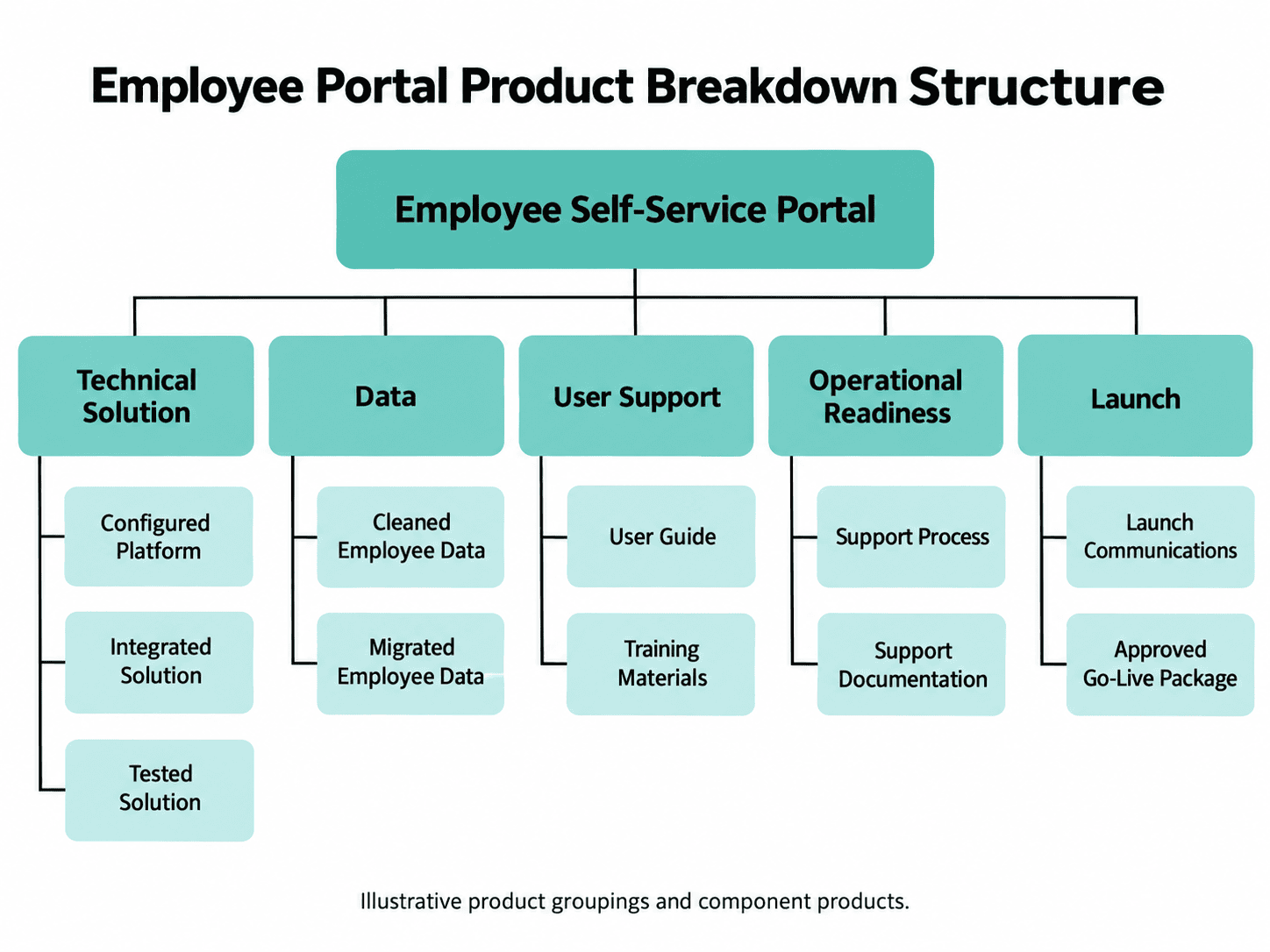
In this example, the Product Breakdown Structure makes it easier to see that the project involves more than delivering a working piece of software.
It also needs appropriate information, guidance, and support arrangements.
The team could use the structure to begin developing Product Descriptions, reviewing quality requirements, and identifying dependencies.
Notice that the hierarchy does not tell us whether data migration must happen before system testing or when the user guide must be completed.
Those questions belong to subsequent planning work.
This is one illustrative breakdown, not the only correct answer. The actual hierarchy would depend on the approved requirements, delivery approach, and project scope.
Product Breakdown Structure vs Product Flow Diagram: What’s the Difference?
A Product Breakdown Structure identifies the products needed and organises them hierarchically. A Product Flow Diagram shows the sequence in which products are produced and their dependencies.
Both form part of PRINCE2’s product-definition and analysis work.
| Feature | Product Breakdown Structure | Product Flow Diagram |
|---|---|---|
| Main question | What products are required? | How are products sequenced and dependent on one another? |
| Main purpose | Organise products | Analyse production sequence and dependencies |
| Structure | Hierarchy | Flow or network |
| Product components | Shows product decomposition | Shows products in delivery relationships |
| Sequence | Not its primary purpose | Yes |
| Dependencies | May help reveal them | Explicitly represents them |
| Example | Portal broken into technical, data, and support products | Configured portal and migrated data feeding into system testing |
Consider the employee portal again.
The PBS may identify configured software, migrated data, and a tested solution.
A Product Flow Diagram can then illustrate how the tested solution depends on other products, such as the configured software and migrated employee data, being available first.
In other words:
PBS = What products are needed?
Product Flow Diagram = In what sequence are products developed, and what depends on what?
Product Breakdown Structure vs Product Description: What’s the Difference?
A Product Breakdown Structure identifies and organises the products required by a plan. A Product Description explains an individual product’s requirements in greater detail.
Think of the PBS as a map of the products that need to exist.
A Product Description provides more detail about one of those products, including relevant quality requirements and how those requirements will be assessed.
For example:
PBS entry: User Guide
Product Description: Explains the purpose of the guide, its intended users, required content, quality criteria, and how its quality will be checked.
Both are needed at the appropriate level of detail.
The PBS helps the team recognise that the guide is required. The Product Description helps establish what an acceptable guide should contain.
Product Breakdown Structure vs Work Breakdown Structure: What’s the Difference?
The main difference between a Product Breakdown Structure and a Work Breakdown Structure is their focus.
A Product Breakdown Structure organises products. A Work Breakdown Structure organises the work needed to deliver those products.
Importantly, both are recognised within the current PRINCE2 planning guidance.
PRINCE2 uses the Work Breakdown Structure to help organise work packages, relate work to responsible teams or suppliers, and support more detailed task and resource planning.
| Feature | Product Breakdown Structure (PBS) | Work Breakdown Structure (WBS) |
|---|---|---|
| Main focus | Products and outputs | Work required |
| Main question | What needs to be produced? | What work needs to be organised? |
| Structure | Product hierarchy | Work hierarchy |
| Example | Configured employee portal | Portal configuration work package |
| PRINCE2 role | Product definition and analysis | Organising work packages and supporting delivery planning |
| Primary benefit | Clarifies required products | Helps organise the work to deliver them |
The PRINCE2 planning technique starts by establishing required products and then develops the work needed to deliver them.
For a simple project involving only a small number of products and delivery arrangements, a detailed Work Breakdown Structure may be unnecessary.
However, when several teams or suppliers are involved, the WBS may help clarify who is responsible for delivering different parts of the work.
A PBS and WBS therefore serve different but complementary purposes.
How Does a Product Breakdown Structure Help With Scope, Quality, and Estimating?
The Product Breakdown Structure supports several aspects of project management by identifying the products that the project is expected to deliver.
It does not manage those areas independently, but it provides useful input into the wider PRINCE2 method.
How Does a Product Breakdown Structure Help Define Scope?
A Product Breakdown Structure helps clarify scope by making required products visible.
When the products are identified and agreed, the team has a clearer reference point for understanding what belongs within the plan.
For example, if someone requests an additional payroll reporting feature for the employee portal, the team can consider whether it falls within the agreed products and requirements.
If not, the proposed addition needs to be assessed through the project’s appropriate issue and change control arrangements.
The PBS itself does not prevent scope creep. It helps establish information that supports scope control.
How Does a Product Breakdown Structure Support Quality Planning?
The PBS identifies which products require further definition.
Product Descriptions can then establish relevant quality specifications, quality methods, and responsibilities.
For example, the PBS may identify migrated employee data as a required product.
A Product Description can provide more detail about what constitutes an acceptable data migration result and how that will be assessed.
This creates a useful connection between identifying the product and establishing whether it is fit for purpose.
The PBS is not intended to contain every quality criterion itself.
How Does a Product Breakdown Structure Help With Estimating?
Identifying the products required by a plan provides a starting point for estimating the work, people, resources, time, and costs involved.
For example, a portal project with only basic functionality may require different resources from a portal requiring several integrations, complex data migration, and extensive user support.
By identifying these products early, the team can develop more realistic planning assumptions.
However, the PBS alone cannot establish accurate estimates.
Product Descriptions, dependencies, work packages, delivery activities, and specialist input are also needed.
Does a Product Breakdown Structure Show Dependencies or Create the Project Schedule?
No. A Product Breakdown Structure is not primarily designed to show product dependencies or create a project schedule.
It shows products as a hierarchy.
However, developing that hierarchy can help the team identify relationships that need further examination.
The Product Flow Diagram is then used to represent product dependencies and production sequence.
From there, PRINCE2 planning addresses work packages, activity estimates, resources, scheduling, and budgeting.
For example, knowing that a tested employee portal is required does not automatically tell the team when the testing should take place.
The required preceding products, delivery activities, resources, and dependencies must be analysed before the schedule can be developed.
Can a Product Breakdown Structure Include External and Management Products?
A Product Breakdown Structure can show external products on which delivery depends. Management products also need to be considered within project planning, but they should not automatically be confused with the specialist products being decomposed.
Can a Product Breakdown Structure Include External Products?
Yes. PRINCE2 recognises external products as products developed or provided outside the project’s control but required for successful delivery.
For example, the employee portal project might depend on an approved employee dataset supplied by another department.
If that dataset is outside the project’s delivery control, it may need to be represented as an external dependency.
The Product Breakdown Structure and Product Flow Diagram should make relevant external-product dependencies visible.
Should Management Products Be Included in a Product Breakdown Structure?
The products included should reflect the scope and purpose of the plan.
PRINCE2 distinguishes between specialist products, which enable users to obtain the intended benefits, and management products, which support the management of the project.
Examples of management products include the Business Case, Plan, and Project Product Description.
A PBS primarily helps organise the products the plan is intended to deliver. It should not be turned into a compulsory list of every PRINCE2 management document.
Relevant management products and project-management work still need to be accounted for within the wider planning arrangements.
The important question is whether the product belongs within the particular plan’s defined scope and contributes to the intended planning information.
Can You Use a Product Breakdown Structure in Agile or Hybrid Projects?
Yes. A Product Breakdown Structure can be used in projects with iterative-incremental, linear-sequential, or hybrid delivery approaches.
Identifying what must be delivered does not automatically determine how development work must be performed.
For example, the employee portal project might use:
- An iterative approach for developing and refining portal functionality.
- A more sequential approach for preparing infrastructure.
- A combination of approaches for migration, testing, and operational readiness.
The PBS helps identify products at a level appropriate to the plan.
In iterative-incremental delivery, detailed product requirements may continue to develop alongside the products themselves.
This means product definition can be progressive rather than assuming every detailed requirement must be finalised at the beginning.
For more on this distinction, read Is PRINCE2 Waterfall?.
How Should a Product Breakdown Structure Be Tailored?
A Product Breakdown Structure should be tailored to the project’s scale, complexity, delivery approach, and product requirements.
A smaller, straightforward project may need relatively few products and only a simple breakdown.
A larger project involving multiple teams, suppliers, or complex technical requirements may benefit from greater detail.
When tailoring the PBS, consider:
- Whether the structure provides enough detail for useful planning.
- Whether product requirements are grouped logically.
- Whether important external dependencies are visible.
- Whether the structure supports the chosen delivery approach.
- Whether further decomposition adds genuine value.
- Whether the hierarchy remains understandable to the people using it.
The goal is to make the structure useful rather than unnecessarily complicated.
Explore our guide to tailoring PRINCE2 to different projects for more on adapting the method to project context.
Common Product Breakdown Structure Mistakes
The most common Product Breakdown Structure mistakes involve confusing products with activities, overlooking required outputs, or treating the hierarchy as a delivery schedule.
Watch for these issues:
- Listing tasks instead of products: “Write training guide” rather than “Training guide”.
- Treating the PBS as a schedule: Assuming products appear in delivery order.
- Missing intermediate products: Overlooking products needed to create other outputs.
- Ignoring external dependencies: Failing to identify products provided outside the project’s control.
- Overcomplicating the hierarchy: Creating levels that don’t contribute useful planning information.
- Using vague labels: Naming products so broadly that their requirements are difficult to understand.
- Treating the first version as final: Failing to review the structure when product requirements change.
A useful PBS makes required products easier to understand. If the structure introduces confusion, it may need refinement.
Product Breakdown Structure Checklist
Frequently Asked Questions About Product Breakdown Structures
What is a Product Breakdown Structure?
A Product Breakdown Structure is a hierarchy of the products required within a plan. In PRINCE2, it helps organise those products and their components so that the project team can understand what must be delivered before planning the activities required.
What is the purpose of a Product Breakdown Structure?
The purpose of a PBS is to identify and organise required products, clarify their components, and support further product definition and planning. It also helps the team understand the scope of delivery.
What goes at the top of a Product Breakdown Structure?
For a Project Plan, the overall Project Product normally provides the starting point. For Stage Plans or Team Plans, the structure focuses on the products within that plan’s scope.
How do you create a Product Breakdown Structure?
Start by identifying the products that the plan must deliver. Organise them into a hierarchy, break them into useful component products, and review the structure against scope, requirements, and relevant external dependencies.
Is a Product Breakdown Structure a task list?
No. A PBS describes products, not the activities needed to create them. For example, “User Guide” is a product, while “Write User Guide” is an activity.
Does a Product Breakdown Structure show dependencies?
Not directly. It may help reveal dependencies, but the Product Flow Diagram is used to show the production sequence and interdependencies between products.
What is the difference between a Product Breakdown Structure and a Product Flow Diagram?
A Product Breakdown Structure organises products hierarchically. A Product Flow Diagram shows the order in which products are produced and how they depend on one another.
What is the difference between PBS and WBS?
A Product Breakdown Structure focuses on required products. A Work Breakdown Structure focuses on organising the work needed to deliver them. Both are recognised within the PRINCE2 7 planning guidance.
Can you use a Product Breakdown Structure in Agile projects?
Yes. PRINCE2 can support iterative-incremental delivery, with product requirements developed progressively where appropriate. A PBS identifies products without requiring all detailed development work to follow a fixed sequential model.
What Should You Explore Next?
A Product Breakdown Structure helps turn a broad project objective into a clearer set of required products.
It provides a foundation for understanding what must be delivered, but it is only one part of the planning process.
Once the products have been identified, the team can define their requirements, analyse dependencies, organise delivery work, prepare estimates, and develop the schedule.
If you’re learning PRINCE2, understanding this distinction will also help you make sense of the wider Plans practice.
You can explore the full method through our PRINCE2 Project Management guide or develop your knowledge through structured PRINCE2 training.
Want to understand how PRINCE2 turns project outputs into structured plans?
Our Course & Career Advisors can help you explore your training options and decide how PRINCE2 fits your professional goals.