What Are PRINCE2 Management Products?
PRINCE2 management products are the information used to plan, manage, monitor, and control a project. They help project teams understand what needs to happen, communicate progress, record important information, and support decisions. PRINCE2 groups these products into three types: baselines, reports, and records. They are different from the specialist products or deliverables the project is creating.
The three types of PRINCE2 management product are:
- Baselines: Define agreed aspects of the project, such as what will be delivered, how work will be organised, and what has been approved.
- Reports: Communicate information about progress, performance, issues, decisions, or lessons at particular points.
- Records: Maintain information that changes throughout the project, such as risks, issues, quality activities, and lessons.
Together, they help the right people access the right information at the right time.
Importantly, PRINCE2 does not require every management product to be a separate, lengthy document. Information can be organised and presented in different ways depending on the needs of the project.
Explore the Management Products
PRINCE2 groups management products into Baselines, Reports, and Records. Choose a category, then select a product to discover how it supports project management.
Baseline Management Products
Select a product to explore its purpose.
Business Case
The justification for undertaking and continuing a project.
To assess whether the expected benefits justify the estimated costs and risks.
Developed early, refined during initiation, and reviewed throughout the project.
Helps decision-makers establish whether starting or continuing the project remains worthwhile.
Remember: Management products provide the information needed to manage a project. They do not all need to be separate documents and can be tailored to suit the project.
Why Does PRINCE2 Use Management Products?
PRINCE2 uses management products to help people make informed decisions, maintain control, and understand what is happening throughout a project.
Imagine a company developing a new online booking platform.
The Project Manager needs to know what must be delivered, the development team needs clear instructions, and the Project Board needs confidence that the investment remains worthwhile.
Without reliable management information, important decisions might depend on assumptions or incomplete updates.
Management products help the team:
- Establish clear expectations: Everyone understands what is being delivered, why it matters, and what successful completion looks like.
- Coordinate work: Plans and descriptions help people understand their responsibilities, priorities, and deadlines.
- Monitor performance: Reports provide visibility of progress against agreed expectations.
- Manage uncertainty: Risks and issues can be identified, assessed, and addressed before they cause unnecessary disruption.
- Support governance: Decision-makers receive the information they need to authorise work, review progress, or intervene.
- Learn from experience: Useful lessons can improve the current project and inform future work.
For example, the booking-platform Project Board might receive a Highlight Report showing that development is progressing as planned but that a supplier dependency requires attention.
The report helps the board stay informed without needing to supervise every development task.
This reflects a wider feature of how PRINCE2 Project Management works: appropriate responsibility and authority are combined with agreed controls and reliable information.
What Are the PRINCE2 Management Products?
PRINCE2 identifies seven baseline management products, seven report management products, and a Project Log containing six named records.
These form the management-product structure described in the current PRINCE2 method.
Baseline Management Products
- Business Case
- Plan
- Product Description
- Project Brief
- Project Initiation Documentation
- Project Product Description
- Work Package Description
The Plan management product covers different levels of planning, including Project Plans, Stage Plans, Exception Plans, and optional Team Plans.
Report Management Products
- Checkpoint Report
- End Project Report
- End Stage Report
- Exception Report
- Highlight Report
- Issue Report
- Lessons Report
Record Management Products
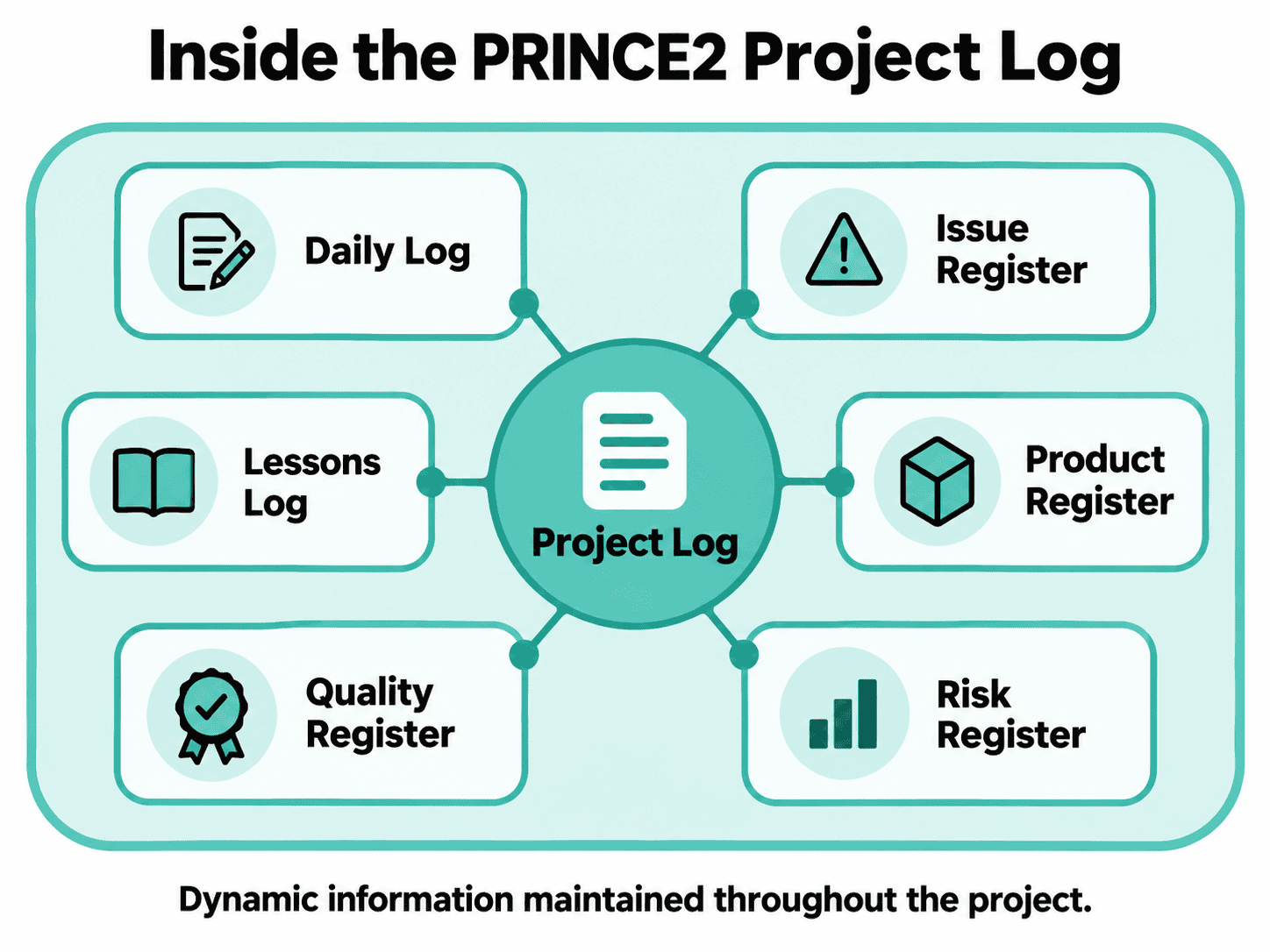
The Project Log contains six named records:
- Daily Log
- Issue Register
- Lessons Log
- Product Register
- Quality Register
- Risk Register
The Project Log can be maintained as an integrated information source or through separate registers and logs.
A useful distinction: The seven baselines, seven reports, and Project Log are the 15 top-level management products described in Appendix A of the official guidance. The Project Log contains six named records; these should not be confused with six additional top-level products.
PRINCE2 Management Products at a Glance
| Management Product | Type | Main Purpose | Typical Relevance |
|---|---|---|---|
| Business Case | Baseline | Justifies the investment. | Early project assessment and throughout delivery. |
| Plan | Baseline | Explains how objectives and work will be achieved. | Planning, delivery, and replanning. |
| Product Description | Baseline | Defines an individual product and its quality requirements. | Before development and acceptance. |
| Project Brief | Baseline | Establishes an initial understanding of the proposed project. | Starting Up a Project. |
| Project Initiation Documentation | Baseline | Establishes the agreed foundation for managing the project. | Initiation, then review and updating. |
| Project Product Description | Baseline | Defines the overall project output and acceptance expectations. | Starting up and initiation. |
| Work Package Description | Baseline | Defines and authorises work delegated to a delivery team. | Managing Product Delivery. |
| Checkpoint Report | Report | Communicates work-package progress. | During delivery. |
| End Project Report | Report | Summarises final project performance and outcomes. | Project closure. |
| End Stage Report | Report | Assesses the performance of a completed management stage. | Stage boundaries. |
| Exception Report | Report | Explains a forecast tolerance breach and options for action. | When an exception is forecast. |
| Highlight Report | Report | Summarises stage progress for the Project Board. | At agreed intervals during a stage. |
| Issue Report | Report | Provides information needed to assess and decide on an issue. | When an issue requires formal consideration. |
| Lessons Report | Report | Communicates useful learning and recommendations. | When lessons need formal reporting. |
| Project Log | Record | Maintains changing project information. | Throughout the project. |
The Project Log includes the Daily Log, Issue Register, Lessons Log, Product Register, Quality Register, and Risk Register.
What Are Baseline Management Products in PRINCE2?
Baseline management products define agreed aspects of the project. Once approved, they are subject to change control, meaning changes must be assessed and handled through the agreed process rather than introduced without appropriate authority.
Think of a baseline as an agreed reference point.
If the booking-platform team originally agreed to deliver online bookings and payment processing, that agreed scope provides a basis for assessing a later request to add a customer loyalty programme.
The team can consider the proposed change against the relevant approved baselines before deciding how to proceed.
Business Case
The Business Case explains why the project is worth undertaking.
It considers expected benefits, estimated costs, and associated risks to help determine whether the investment is justified. It also considers how and when the expected benefits can be measured.
For the booking-platform project, the Business Case might consider whether improved customer convenience and reduced administrative work justify the cost of developing the platform.
Because circumstances change, the Business Case is reviewed throughout the project to check that continuing remains worthwhile.
Plan
A PRINCE2 Plan explains what will be delivered, how work will be organised, when activities should happen, and which resources will be needed.
PRINCE2 uses plans at different management levels:
- Project Plan: Provides an overall view of delivery.
- Stage Plan: Provides more detailed information for a particular management stage.
- Team Plan: Can be used where a delivery team needs additional planning detail.
- Exception Plan: May replace an existing plan when an approved response to an exception requires replanning.
For example, the booking-platform Project Plan might cover the complete development and implementation, while a Stage Plan concentrates on designing and testing the booking functionality.
The level of planning detail should suit the decisions being made and the people responsible for carrying out the work.
Product Description
A Product Description defines a particular product that needs to be created, including its required quality characteristics and how those requirements will be checked.
For example, a Product Description for the booking confirmation feature might specify what information must appear in the confirmation, what quality standards apply, and how it will be tested.
The description helps the team agree on what is required before development and provides a reference for quality checking.
It is important not to confuse a Product Description with the actual product being delivered. The description provides information about the product, while the development team creates the product itself.
Project Brief
The Project Brief establishes an initial understanding of the project before a detailed commitment is made.
It brings together early information about the project’s purpose, scope, approach, and justification.
For the booking-platform project, the Project Brief might explain the problems with the existing booking process, the proposed solution, and the initial delivery expectations.
It provides a foundation for deciding whether the project should proceed into initiation.
The Project Brief is not the same as Project Initiation Documentation. It provides an earlier, less detailed basis for understanding and assessing the proposed project.
Project Initiation Documentation
Project Initiation Documentation, commonly abbreviated to PID, establishes the agreed foundation for managing and controlling the project.
It builds on information developed during the start-up process and brings together details such as the Business Case, Project Plan, management approaches, project organisation, and tailoring arrangements.
The PID helps the Project Board decide whether the project is sufficiently defined to proceed. It also gives the Project Manager a reference for managing the work.
Although it is a baseline management product, the PID is not necessarily one physical document. Its information can be held in different linked documents or systems.
The PID is also reviewed and updated where appropriate as the project develops, with agreed baseline information preserved for reference.
Project Product Description
The Project Product Description defines the overall output the project intends to deliver, including user quality expectations and acceptance criteria.
For the booking-platform project, it might describe the complete platform, its intended users, its major capabilities, and the conditions it must satisfy before acceptance.
It helps establish a shared understanding of the project’s intended output before detailed delivery planning progresses.
The difference between a Product Description and a Project Product Description is the level of focus.
A Product Description defines an individual product. The Project Product Description defines the overall project output and its acceptance requirements.
Work Package Description
A Work Package Description defines the work being delegated to a team, including the products to be delivered, relevant constraints, tolerances, and reporting arrangements.
For example, the Project Manager might authorise the development team to complete the payment integration within an agreed timeframe, with defined quality expectations and progress-reporting requirements.
This gives the team a clear basis for carrying out the work and helps the Project Manager monitor delivery.
The Work Package Description also helps establish the agreement between the Project Manager and Team Manager about what is being authorised and how completion will be confirmed.
What Are PRINCE2 Reports?
PRINCE2 reports communicate information about project progress, performance, issues, decisions, or lessons at particular points.
Unlike records, which are maintained as information changes, reports generally communicate a snapshot or focused account of a situation.
Different reports support different management decisions.
Checkpoint Report
A Checkpoint Report provides the Project Manager with information about progress on an assigned work package.
It is normally produced by the Team Manager at agreed intervals.
For example, the booking-platform development team might report that the payment feature is complete, testing is underway, and a technical dependency may affect the next milestone.
The Project Manager can then use this information to understand how delivery is progressing and whether corrective action might be needed.
Highlight Report
A Highlight Report gives the Project Board an overview of the current management stage at agreed intervals.
It helps the board understand progress, important developments, and forecast performance without becoming involved in day-to-day management.
For example, the Project Manager might issue a Highlight Report explaining that the platform remains on schedule, although additional testing may be needed.
Checkpoint Reports communicate delivery-team progress to the Project Manager. Highlight Reports communicate stage-level progress from the Project Manager to the Project Board.
End Stage Report
An End Stage Report reviews how the current management stage performed against its plan.
It provides information to support the Project Board’s decision about whether and how the project should continue.
For the booking-platform project, it might assess whether the design stage delivered its expected outputs, explain deviations, and identify lessons relevant to the next stage.
This helps the Project Board assess the project’s position before authorising further work.
Exception Report
An Exception Report is used when a project or management stage is forecast to exceed its agreed tolerances.
It communicates the situation, its implications, and options for responding so that the appropriate management level can decide what happens next.
For example, if the Project Manager forecasts that supplier delays will cause the stage to exceed its authorised time tolerance, an Exception Report may be needed.
This supports the PRINCE2 principle of Manage by Exception, which helps keep decisions at the appropriate level.
An Exception Report is not the same as an Exception Plan. The report communicates the forecast problem and options for action, while an Exception Plan may be developed to replace the affected plan if requested and authorised.
End Project Report
An End Project Report provides an overall assessment of project performance when the project is closing.
It compares the project with its original expectations, considers delivery and performance, and identifies matters requiring follow-up.
For example, the booking-platform End Project Report might confirm which capabilities were delivered, whether acceptance criteria were met, and what work remains for the operational team.
The report helps the Project Board assess the project’s final position and supports a controlled closure decision.
Issue Report
An Issue Report provides a focused assessment of an issue that requires formal consideration.
It helps decision-makers understand the issue, its potential impact, and the available response options.
Suppose a department requests a major change to the booking platform after development is underway.
An Issue Report could help assess the effect on costs, timelines, scope, and the Business Case before a decision is made.
Not every minor issue needs a separate formal Issue Report. The level of analysis should reflect the issue’s significance and the project’s agreed management arrangements.
Lessons Report
A Lessons Report communicates learning that could improve the current project or future projects.
It draws on experience gathered during delivery and can be produced when useful insights need to be shared.
For example, the booking-platform team might discover that involving frontline booking staff earlier would have prevented avoidable changes to the interface.
Sharing that lesson could improve future digital projects.
Lessons should not be treated as information that is only collected at closure. PRINCE2 encourages learning throughout the project.
What Are PRINCE2 Records?
PRINCE2 records are dynamic management products used to maintain information that changes throughout a project.
They provide an ongoing view of matters such as risks, issues, products, quality activities, and lessons.
Rather than representing an approved baseline or a periodic report, records are updated as new information becomes available.
What Is the PRINCE2 Project Log?
The Project Log is the collection of dynamic records used to capture and maintain important project information.
It contains six named logs and registers.
What Registers and Logs Make Up the Project Log?
Daily Log
The Daily Log captures informal issues, actions, observations, and significant events that are not recorded elsewhere.
It can act as a project diary, helping the Project Manager keep track of matters that may need attention without immediately creating a formal issue or risk record.
For example, the Project Manager might record a discussion with a supplier about an upcoming delivery dependency.
Issue Register
The Issue Register tracks issues raised during the project, including their status and how they are being managed.
For example, if the booking-platform team identifies that a required feature does not meet its agreed specification, the issue can be recorded and monitored until it is resolved or otherwise addressed.
The Issue Register maintains the ongoing record, while an Issue Report may provide more detailed analysis when needed.
Lessons Log
The Lessons Log records learning identified throughout the project.
This can include lessons from previous projects that may be useful, as well as new lessons identified during current work.
For example, the team might record that involving operational users in early design reviews helped avoid later misunderstandings.
Lessons can be applied during the current project rather than waiting until closure.
Product Register
The Product Register tracks the products required for a plan and their current status.
It helps the team understand which products are being developed, which have completed relevant activities, and which have been accepted.
For the booking-platform project, the Product Register could track the booking interface, payment integration, customer notifications, and other required products.
Quality Register
The Quality Register maintains information about planned and completed quality activities.
It provides visibility of quality checks, their results, and relevant follow-up actions.
For example, the Quality Register might show which platform features have completed testing and which still require further assessment.
This supports the Quality practice by making quality activities and their results traceable.
Risk Register
The Risk Register records identified threats and opportunities, along with information used to assess and manage them.
It is updated as risks are identified, reassessed, addressed, or closed.
For example, the booking-platform Project Manager might use the Risk Register to track the possibility of a third-party payment supplier failing to meet the required integration deadline.
If the uncertain event becomes an actual problem, the project may also need to record and manage an issue.
| Record | What It Tracks |
|---|---|
| Daily Log | Informal issues, actions, observations, and significant events |
| Issue Register | Issues raised during the project and their current status |
| Lessons Log | Lessons identified and learning that could improve work |
| Product Register | Products required and their development or acceptance status |
| Quality Register | Planned and completed quality activities and their results |
| Risk Register | Identified threats and opportunities, assessments, responses, and status |
The Project Log does not have to exist as a single spreadsheet or document.
A project might use a dedicated risk-management system, a shared issue tracker, and another tool for maintaining quality records.
What matters is that the agreed information can be maintained, accessed, and used effectively.
What Is the Difference Between a Management Product and a Project Product?
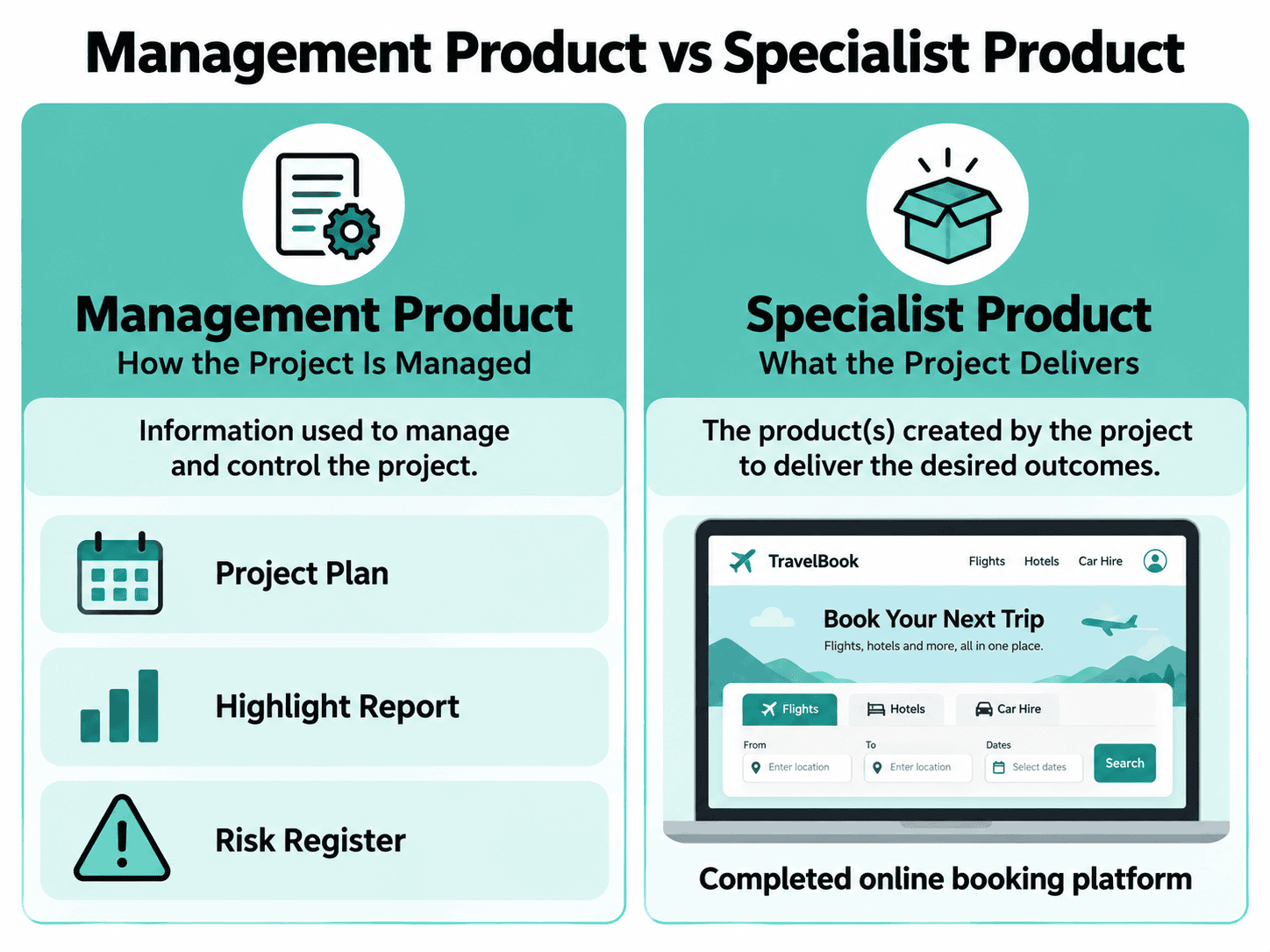
A management product helps people manage the project, while a specialist product is something created to fulfil the project’s objectives.
The distinction is important because PRINCE2 uses the word “product” in different contexts.
| Management Product | Specialist Product |
|---|---|
| Supports project management and control | Is created to meet the project’s requirements |
| Provides information for planning, reporting, decisions, or governance | Contributes to the outputs and benefits the project is intended to deliver |
| Examples include Plans, Highlight Reports, and the Risk Register | Examples include software, equipment, a new service, or a redesigned business process |
In our booking-platform example, the completed platform is the main specialist output.
The Project Plan explains how it will be developed, the Risk Register tracks uncertainty, and Highlight Reports keep decision-makers informed.
These are management products.
A Product Description is also a management product. It describes what needs to be created, but it is not the finished product itself.
PRINCE2 also uses the broader term “project products” for products created during the project, including both specialist and management products.
The distinction here is between the information used to manage delivery and the specialist outputs being delivered.
Do PRINCE2 Management Products Have to Be Documents?
No. PRINCE2 management products do not have to be traditional written documents. They can be maintained and communicated in different formats, provided they contain the information needed to support effective project management.
Depending on the project, suitable formats might include:
- Documents and presentations
- Spreadsheets and databases
- Dashboards and project-management systems
- Emails and meeting notes
- Visual boards and other shared information displays
For example, a Highlight Report might be presented through a dashboard rather than a formal Word document.
Similarly, a Risk Register could be maintained in an existing project-management tool instead of a separate spreadsheet.
The important consideration is not the number of files produced, but whether people can access reliable information and use it to fulfil their responsibilities.
This is particularly useful for organisations already using digital project-management systems.
Do You Need to Create Every PRINCE2 Management Product Separately?
No. PRINCE2 allows management products to be combined, divided, renamed, or presented differently where appropriate to the project.
The purpose of the necessary management information must still be fulfilled.
For example, a smaller project might combine several related items into one manageable reference document.
A large programme-related project might maintain separate records in specialist systems because different teams need to access and update them.
The goal is to maintain appropriate control without introducing unnecessary administration.
However, tailoring does not mean removing essential information, avoiding required decisions, or bypassing governance arrangements.
The Project Manager must consider what information is needed, how it will be maintained, who is responsible for it, and which approvals or controls apply.
How Can PRINCE2 Management Products Be Tailored?
PRINCE2 management products can be tailored according to a project’s scale, complexity, risk, delivery method, organisational requirements, and management needs.
Tailoring might involve:
- Combining management products that serve related purposes.
- Dividing a management product into smaller, easier-to-maintain components.
- Adjusting the information included to reflect project requirements.
- Using alternative formats, such as dashboards or digital systems.
- Adapting terminology to align with organisational standards.
- Changing reporting arrangements or levels of detail to suit the project.
The objective is not to produce less information simply for the sake of doing less work.
It is to make sure the information being maintained is useful, proportionate, and supports appropriate project control.
How Does Tailoring Work on Smaller, Agile, and Hybrid Projects?
Different projects may benefit from different approaches to managing and communicating information.
Tailoring PRINCE2 Management Products
| Project Context | Possible Tailoring |
|---|---|
| Small internal improvement project | Combine related information and use concise reports |
| Large infrastructure project | Maintain more detailed records, approval evidence, and reporting arrangements |
| Agile software project | Use existing delivery tools and visual information sources where they provide suitable management information |
| Hybrid project | Combine formal governance reporting with information from iterative delivery teams |
These are examples, not fixed requirements for particular project types.
For the booking-platform project, the development team could use an existing Kanban board to communicate delivery progress, while the Project Manager provides the Project Board with a concise Highlight Report based on the relevant information.
The project’s agreed management approaches should explain how these arrangements work.
For a deeper explanation, explore how to tailor PRINCE2 to different projects.
How Are PRINCE2 Management Products Used Throughout the Project Lifecycle?
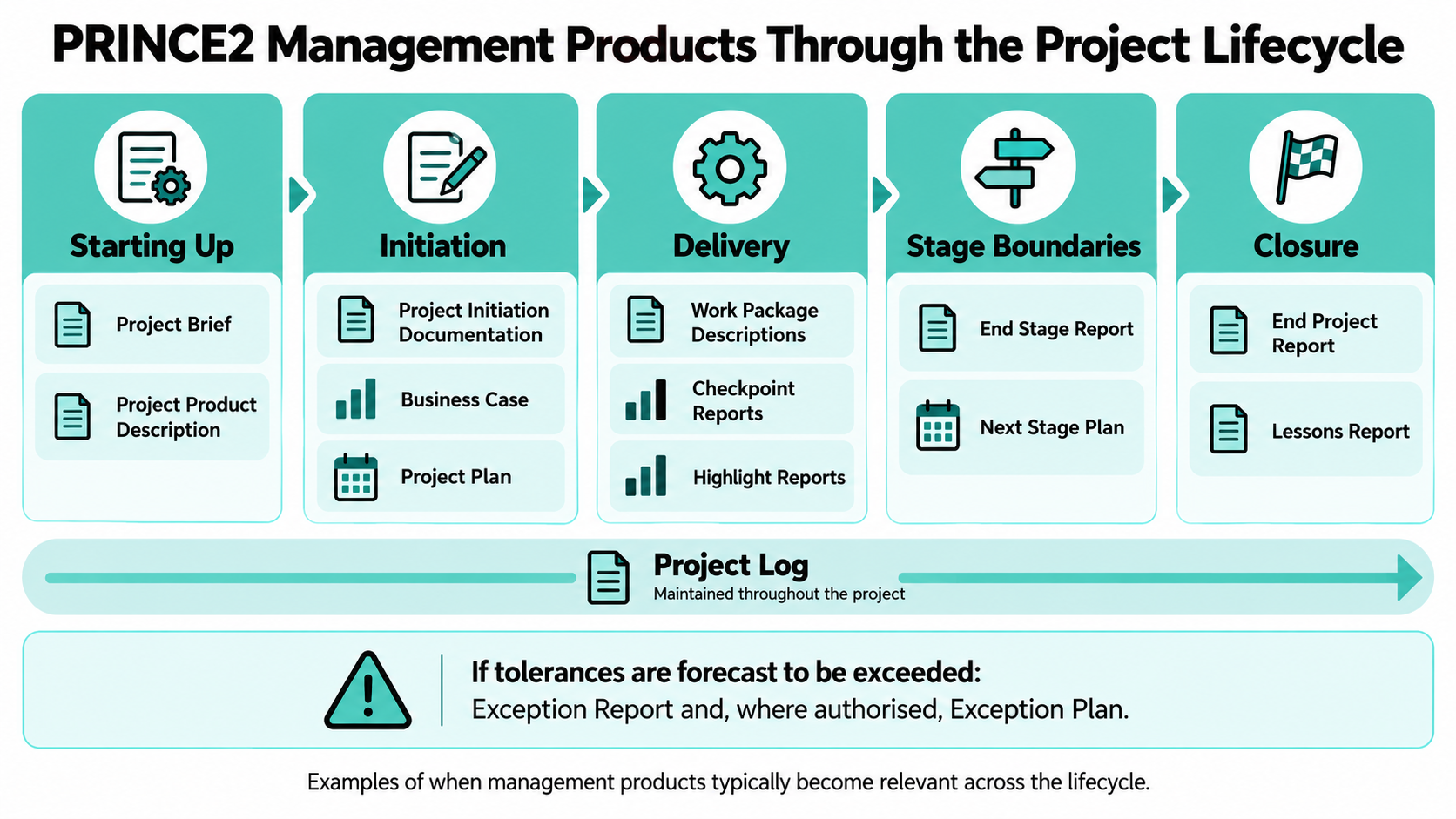
PRINCE2 management products are created, reviewed, updated, and used at different points throughout the project lifecycle.
Some help define the project before substantial investment is authorised. Others support ongoing delivery, stage decisions, or closure.
Before the Project Begins
During Starting Up a Project, the team develops an initial understanding of what is proposed and why.
The Project Brief and Project Product Description are particularly important.
They help establish the basis for deciding whether the proposed project is sufficiently worthwhile and understood to proceed into initiation.
During Project Initiation
The project is defined in greater detail.
The Project Initiation Documentation brings together the agreed basis for managing the project, including the Business Case, Project Plan, and management approaches.
Relevant Project Log records are also established.
These products help the Project Board decide whether to authorise the project.
During Management Stages
Management information supports ongoing delivery and control.
Work Package Descriptions establish what delivery teams are expected to produce.
Checkpoint Reports provide work-package progress information, while Highlight Reports provide the Project Board with stage-level updates.
The Project Log is updated as information changes.
At a Stage Boundary
The Project Manager assesses the current management stage, reviews relevant baselines, and prepares information needed for the next decision.
An End Stage Report and the proposed next Stage Plan help the Project Board assess whether continuation is justified.
The Business Case and other relevant information are reviewed and updated where necessary.
When an Exception Occurs
If a project or management stage is forecast to exceed its tolerances, an Exception Report communicates the situation and supports escalation.
Depending on the decision made, an Exception Plan may be requested to replace the affected plan.
Exception management is a conditional activity, not an additional management stage that every project must pass through.
When the Project Closes
The End Project Report provides an overall assessment of the project.
Lessons and outstanding matters are captured, and relevant records are reviewed and closed.
The information supports a controlled handover and helps the organisation learn from its investment.
How Do Management Products Support the PRINCE2 Practices and Processes?
Management products provide information that helps teams apply the seven PRINCE2 practices and carry out activities across the seven processes.
They connect the method’s ongoing management responsibilities with the information needed to perform those responsibilities effectively.
How Management Products Support the Seven Practices
The practices explain the aspects of project management that require continuous attention.
Different management products support these activities.
| PRINCE2 Practice | Examples of Supporting Management Information |
|---|---|
| Business Case | Business Case, benefits-related management information |
| Organising | Project Initiation Documentation, role descriptions, communication arrangements |
| Plans | Plans, Product Descriptions, Work Package Descriptions |
| Quality | Product Descriptions, Project Product Description, Quality Register |
| Risk | Risk Register, risk-management arrangements |
| Issues | Issue Register, Issue Reports, issue-management arrangements |
| Progress | Highlight Reports, Checkpoint Reports, End Stage Reports, Exception Reports |
These relationships are not exclusive. A single management product can support several practices.
For example, a Product Description supports planning and quality, while the Business Case informs decisions about continued investment throughout the project.
Management approaches also support the practices by establishing agreed procedures, standards, techniques, and responsibilities.
These approaches may form part of the Project Initiation Documentation rather than being maintained as separate top-level management products.
Explore the seven PRINCE2 practices to understand these ongoing management responsibilities.
How Management Products Are Used Across the Seven Processes
The processes describe the management activities carried out as the project progresses.
Management products help those activities produce, communicate, and maintain the necessary information.
For example:
- Starting Up a Project: Develop the Project Brief and initial project information.
- Directing a Project: Use management information to support Project Board decisions.
- Initiating a Project: Assemble the Project Initiation Documentation and establish management arrangements.
- Controlling a Stage: Use reports, records, and work-package information to monitor and control delivery.
- Managing Product Delivery: Use Work Package Descriptions and Checkpoint Reports to coordinate and communicate team progress.
- Managing a Stage Boundary: Review performance, update relevant information, and prepare the next Stage Plan.
- Closing a Project: Prepare the End Project Report and finalise relevant project records.
Management products do not belong permanently to a single process.
They may be created in one process and used, reviewed, or updated through several others.
Learn more about the seven PRINCE2 processes and how management activities work together throughout the lifecycle.
Who Creates, Reviews, and Approves PRINCE2 Management Products?
Responsibility depends on the management product, the relevant PRINCE2 role, and the arrangements agreed for the project.
The responsibilities for creating, reviewing, and approving management information should be clear so that important decisions do not depend on assumptions about who is accountable.
In general:
- Project Board: Directs the project, approves important baselines, and uses management information to make decisions.
- Project Manager: Coordinates the preparation and maintenance of management information and provides reports to the Project Board.
- Team Manager: Uses Work Package Descriptions and reports delivery progress through Checkpoint Reports.
- Project Assurance: Provides independent assurance on relevant information, controls, and management activities.
- Project Support: May help maintain registers, logs, documentation, and information systems.
For example, the Project Manager normally prepares the Highlight Report, while the Project Board reviews it.
The Team Manager normally provides Checkpoint Reports to the Project Manager.
Detailed responsibilities should be established according to the project’s management arrangements, particularly when roles are combined or responsibilities are delegated.
Explore PRINCE2 roles and responsibilities for a fuller explanation of how accountability and authority work.
Which PRINCE2 Management Product Would You Use?
Understanding a definition is useful, but recognising when to use a management product is what makes the method practical.
Consider these examples from our booking-platform project.
Choosing the Right PRINCE2 Management Product
| Situation | Relevant Management Product |
|---|---|
| The Project Board needs a regular summary of stage progress. | Highlight Report |
| The development team needs to report work-package progress. | Checkpoint Report |
| A new supplier dependency might affect delivery. | Risk Register |
| A requested feature change needs formal assessment. | Issue Report |
| A delivery team needs clear instructions and agreed tolerances. | Work Package Description |
| The current stage is ending, and continuation must be considered. | End Stage Report |
| The project is approaching completion and needs a final performance assessment. | End Project Report |
The most appropriate product depends on what information is needed and the decision or activity it supports.
How Does Understanding Management Products Help You Learn PRINCE2?
Understanding PRINCE2 management products helps you see how the different parts of the method work together.
Instead of treating the Business Case, Risk Register, Highlight Report, and Project Plan as unrelated pieces of documentation, you begin to understand how they support real project decisions.
For example, you can recognise:
- Why an approved plan provides a reference for monitoring progress.
- How information in the Risk Register helps teams respond to uncertainty.
- Why Checkpoint Reports and Highlight Reports serve different management levels.
- How an Exception Report supports decisions when agreed tolerances may be exceeded.
- Why the Project Initiation Documentation provides an agreed foundation for managing a project.
This understanding becomes especially useful when learning how PRINCE2 is applied and tailored to different project situations.
How Are Management Products Covered in PRINCE2 Training?
PRINCE2 management products form part of understanding the wider PRINCE2 Project Management method.
The Foundation qualification helps learners develop their understanding of PRINCE2 terminology, principles, practices, processes, and management arrangements.
The Practitioner qualification builds on this knowledge by focusing on applying and tailoring the method in project situations.
At ITonlinelearning, you can explore:
- PRINCE2® Project Management Foundation
- PRINCE2® Project Management Practitioner
- PRINCE2® Project Management Foundation and Practitioner
If you’re unsure where to begin, our guide to PRINCE2 Foundation vs Practitioner explains the differences between the qualifications.
Frequently Asked Questions About PRINCE2 Management Products
How Many Management Products Are There in PRINCE2?
PRINCE2 defines 15 top-level management-product outlines in Appendix A of the official guidance. These comprise seven baselines, seven reports, and the Project Log. The Project Log contains six named records: the Daily Log, Issue Register, Lessons Log, Product Register, Quality Register, and Risk Register. These records form part of the Project Log rather than being counted as six additional top-level products.
What Are the Three Types of PRINCE2 Management Product?
The three types of PRINCE2 management product are baselines, reports, and records. Baselines define agreed aspects of the project and are subject to change control once approved. Reports communicate information about progress, performance, issues, or decisions at particular points. Records maintain changing project information throughout the lifecycle. Together, these products provide the information needed to manage and control the project effectively.
What Is the Difference Between a Project Brief and Project Initiation Documentation?
The Project Brief provides an initial understanding of a proposed project and helps determine whether it should proceed into initiation. Project Initiation Documentation develops that initial information into the agreed basis for managing and controlling the project. It includes more detailed information about the Business Case, Project Plan, management approaches, responsibilities, and project arrangements. The Project Brief therefore comes earlier, while the PID supports project authorisation and ongoing management.
What Is the Difference Between a Product Description and a Project Product Description?
A Product Description defines an individual product, including its quality requirements and the means by which those requirements will be checked. The Project Product Description defines the overall output of the project, including major products, user quality expectations, and acceptance criteria. For example, a booking-platform project might have a Project Product Description for the complete platform and individual Product Descriptions for particular components or capabilities.
What Is the Difference Between a Highlight Report and a Checkpoint Report?
A Highlight Report provides the Project Board with a summary of progress during a management stage, normally prepared by the Project Manager at agreed intervals. A Checkpoint Report provides the Project Manager with information about progress on a work package, normally from the Team Manager. Both support project monitoring, but they operate at different management levels and help different people fulfil their responsibilities.
Is a Risk Register a PRINCE2 Management Product?
Yes. The Risk Register is one of the six named records maintained within the PRINCE2 Project Log. It contains information about identified threats and opportunities, including their assessment, planned responses, responsibilities, and current status. The Risk Register is dynamic because risks can emerge, change, or be closed throughout the project. It supports the Risk practice and provides information that can inform decisions, plans, and reports.
What Is the Difference Between an Exception Report and an Exception Plan?
An Exception Report communicates that a project or management stage is forecast to exceed its agreed tolerances. It explains the situation, its implications, and possible responses so that the appropriate management level can make a decision. An Exception Plan may then be requested to replace the affected plan. The report supports escalation and decision-making, while the plan describes how the authorised response will be carried out.
Do PRINCE2 Management Products Have to Be Documents?
No. PRINCE2 management products can be maintained and communicated in different formats, including documents, spreadsheets, presentations, information systems, emails, and visual displays. The format should reflect the project’s needs and agreed management arrangements. For example, a Highlight Report might be presented through a dashboard, while a Risk Register could be maintained in project-management software. The important requirement is that the necessary information remains reliable, accessible, and useful.
Can PRINCE2 Management Products Be Combined?
Yes. PRINCE2 allows management products to be combined where they serve related purposes and doing so suits the project. They can also be divided into smaller components, renamed, or maintained in alternative formats. For example, a relatively straightforward project might combine related management information into one shared reference document. However, tailoring must preserve the information and controls needed for effective management rather than removing important governance requirements.
Can PRINCE2 Management Products Be Tailored?
Yes. PRINCE2 management products can be tailored according to a project’s scale, complexity, risk, delivery method, organisational requirements, and team capabilities. Tailoring may involve changing the level of detail, presentation format, composition, naming, or way information is maintained. The objective is to establish arrangements that are proportionate to the project while preserving the principles and management controls that make PRINCE2 effective.
Are PRINCE2 Management Products Used in Agile Projects?
Yes. PRINCE2 can be used with linear-sequential, iterative-incremental, and hybrid delivery approaches. Management products can be adapted to work alongside the tools and information sources used by delivery teams. For example, an Agile team might use visual boards or digital systems to communicate progress, while the wider project retains appropriate governance reporting and decision-making arrangements. The information and controls must still meet the needs of the project.
What Is the Difference Between a Management Product and a Project Deliverable?
A management product provides information used to manage and control a project, while a specialist deliverable is an output created to meet the project’s objectives. For example, the Project Plan and Risk Register are management products, while a completed booking platform is a specialist product. A Product Description is also a management product because it defines requirements for something being created rather than being the finished product itself.
What Should You Explore Next?
PRINCE2 management products provide the information needed to plan work, communicate progress, maintain control, and support decisions throughout a project.
Understanding the difference between baselines, reports, and records helps you recognise what information is needed, when it becomes relevant, and how it supports the people responsible for managing delivery.
Just as importantly, PRINCE2 allows that information to be tailored to the project’s circumstances.
The goal is not to produce documentation for its own sake, but to make sure the project is managed with appropriate information and controls.
If you’d like to build on what you’ve learned, these guides are useful next steps:
- Complete Guide to PRINCE2 Project Management – Explore how the wider method works.
- The Seven PRINCE2 Practices – Understand the ongoing management responsibilities supported by management products.
- The Seven PRINCE2 Processes – See how management information is used throughout the lifecycle.
- PRINCE2 Roles and Responsibilities – Understand who makes decisions and carries out project management responsibilities.
- How to Tailor PRINCE2 to Different Projects – Explore how project management arrangements can be adapted to suit different circumstances.
If you’re considering a PRINCE2 qualification, you can also speak with an ITonlinelearning Course & Career Advisor about your options.