Issue Management in PRINCE2
PRINCE2 issue management provides a structured way to handle events, concerns, opportunities, and proposed changes that need project management attention. The Issues Practice helps teams capture and assess these matters, recommend appropriate responses, make authorised decisions, and implement agreed action. It also controls changes to the project’s approved baseline, helping prevent changes from being introduced without proper consideration.
An issue isn’t necessarily a problem. Sometimes it’s an unexpected opportunity, a change request, or something happening outside the project that needs a decision.
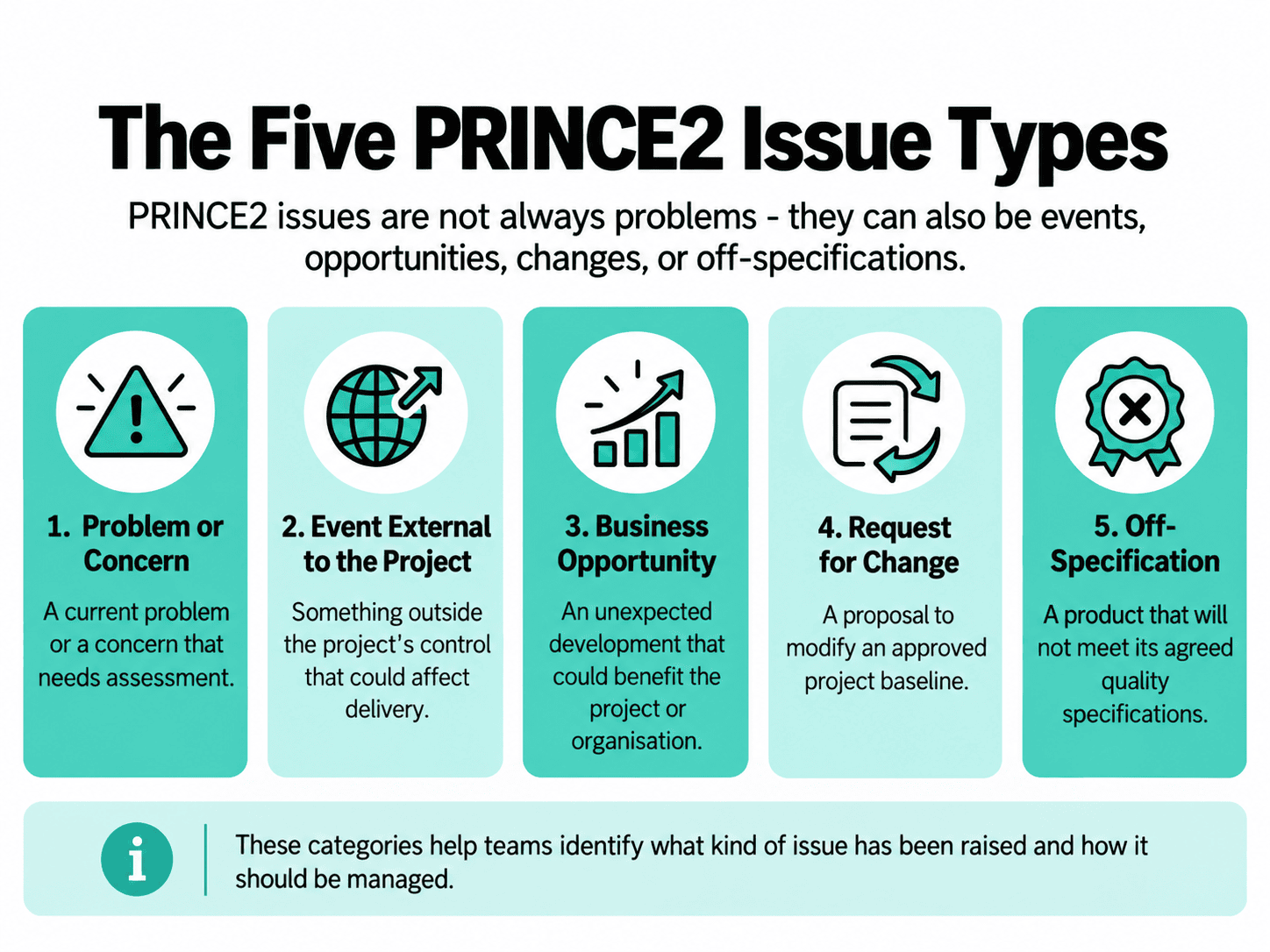
PRINCE2 7 recognises five issue categories:
- Problem or concern
- Event external to the project
- Business opportunity
- Request for change
- Off-specification
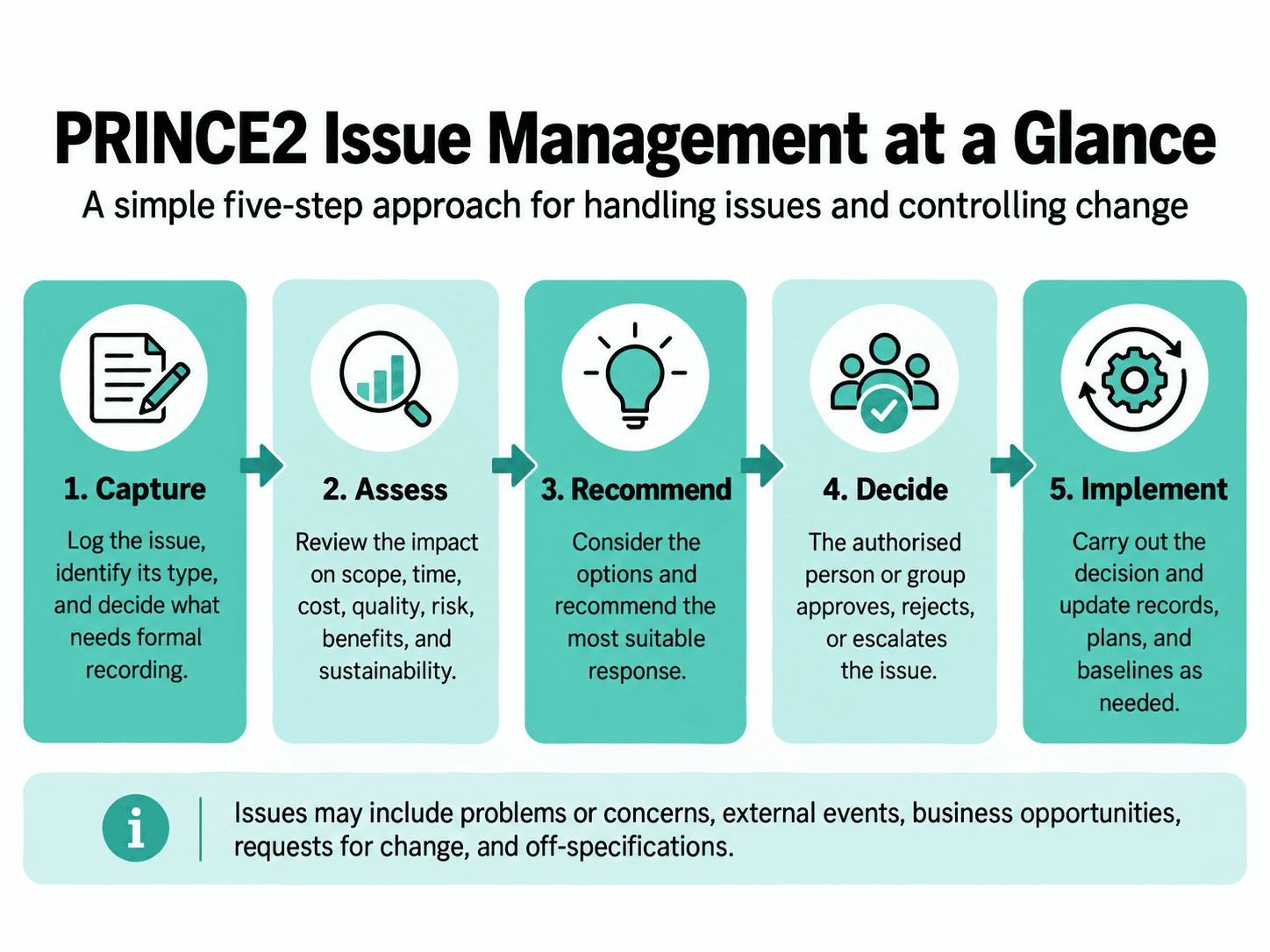
The method also recommends five steps for managing issues: capturing, assessing, recommending resolution, deciding on changes, and implementing changes.
What Is PRINCE2 Issue Management?
PRINCE2 issue management is the process of identifying and responding to events that require project management consideration, while controlling changes to approved project baselines.
Imagine you’re managing a project to develop a new customer-service portal. Halfway through delivery, a stakeholder asks for a live-chat feature that wasn’t included in the agreed requirements.
The request might be valuable. It could improve customer satisfaction and reduce support waiting times.
But it could also mean extra development, licensing costs, testing, and changes to the delivery schedule.
You wouldn’t want to approve it without understanding those consequences.
That’s where PRINCE2 issue management comes in. It provides a way to assess the request, identify who has authority to decide, and control any approved changes.
This same approach applies to much more than requests for additional functionality.
What Is an Issue in PRINCE2?
An issue in PRINCE2 is an event relevant to the project that requires project management consideration.
The important distinction is that something doesn’t have to go wrong before it becomes an issue.
For example, your project team could encounter:
- A supplier confirming that an essential component will arrive late.
- A customer requesting a change to agreed functionality.
- An unexpected opportunity to reduce equipment costs.
- New legislation that affects the project’s requirements.
- A product that won’t meet its agreed quality specifications.
Each situation may require consideration, assessment, or a decision.
Some issues can be resolved quickly. Others may have wider consequences for the project’s scope, costs, timescales, benefits, or justification.
An issue may be raised by a project team member or stakeholder at any point during the project.
What Is the PRINCE2 Issues Practice?
The PRINCE2 Issues Practice is one of the seven PRINCE2 Practices. Its purpose is to collect and assess issues and control changes to the project’s baseline.
Each Practice helps answer a particular project management question.
For the Issues Practice, that question is:
“What now?”
When something unexpected happens, or somebody proposes a change, the project needs to understand what it means and how to respond.
The Issues Practice helps establish:
- How issues will be identified and recorded.
- How their impact will be assessed.
- How potential resolutions will be considered.
- Who has authority to make decisions.
- How changes to approved baselines will be controlled.
- How decisions and resulting actions will be recorded.
The project’s Issue Management Approach documents the arrangements for carrying out these activities.
An important principle is that change isn’t automatically undesirable. PRINCE2 encourages projects to respond to changing circumstances, provided decisions are made and implemented in a controlled way.
What Types of Issues Does PRINCE2 Recognise?
PRINCE2 7 recommends categorising issues into five types. Each helps the team understand what has happened and how it should be assessed.
| Issue type | What it means | Example |
|---|---|---|
| Problem or concern | A problem has an immediate negative impact; a concern needs assessment | A critical team member resigns |
| Event external to the project | An outside event potentially affects the project | New regulations are introduced |
| Business opportunity | An unexpected positive development | A supplier offers a more efficient component |
| Request for change | A proposal to change an approved baseline | A stakeholder requests live chat |
| Off-specification | A product won’t meet its agreed quality specifications | A reporting module cannot meet its response-time requirement |
Problem or Concern
A problem is an issue that has an immediate negative impact. A concern is a matter whose timing and impact need further assessment.
For example, imagine your project loses its lead software developer during an important delivery stage.
That’s a current problem. The Project Manager needs to understand how it affects the remaining work and identify an appropriate response.
A concern might be that communication between two delivery teams has become ineffective. The Project Manager may need to investigate whether this is affecting coordination or delivery.
The key is to assess the situation rather than dismiss it or automatically escalate it.
Event External to the Project
An external event occurs outside the project’s direct control but may still affect its objectives or delivery arrangements.
Imagine a project involving the installation of specialist equipment.
During delivery, new import restrictions are introduced that affect the equipment’s availability.
The project cannot control the regulation, but it may need to assess alternative suppliers, costs, delivery dates, and compliance requirements.
The event is relevant because it may require the project to change its plans or products.
Business Opportunity
A business opportunity is an issue that offers unexpected positive consequences for the project or user organisation.
For example, a supplier might introduce a more efficient component that reduces the running costs of the finished product.
Adopting it could increase the project’s benefits.
However, the alternative might also require design changes, additional testing, or different maintenance arrangements.
The project needs to assess both the advantages and the consequences before deciding.
This is why PRINCE2 doesn’t treat every issue as a negative development.
Request for Change
A request for change is a proposal to modify an approved baseline.
Imagine your project has an agreed customer-service portal specification. A senior stakeholder asks the team to add live-chat functionality.
The proposed feature wasn’t part of the approved requirements, so the request needs to be considered through the project’s change-control arrangements.
The team should establish what would change, why it would be beneficial, what it would cost, and how it could affect the project.
Importantly, requesting a change doesn’t mean the change has been approved.
A senior stakeholder’s enthusiasm for a feature doesn’t automatically give them authority to alter the agreed baseline.
For a deeper look at managing additional requirements, see our guide to How PRINCE2 Helps Manage Scope Creep.
Off-Specification
An off-specification occurs when a product will not meet its agreed quality specifications.
For example, your project’s reporting module must generate an agreed report within two seconds.
Testing reveals that the current architecture cannot achieve this requirement.
The team now has a discrepancy between what was agreed and what the product can deliver.
This is different from a request for change. Nobody is necessarily asking for additional functionality. Instead, the existing product cannot meet its approved specification.
The Project Manager needs to assess the situation and determine what corrective action or decision is required.
If the authorised decision-maker agrees to accept the off-specification without corrective action, this is called a concession.
An accepted concession requires the relevant baseline to be updated.
If the off-specification isn’t accepted, the Team Manager and Project Manager need to consider how the situation can be corrected, including whether additional resources, change funding, or escalation may be required.
Learn more about defining requirements and checking products in our guide to How Quality Management Works in PRINCE2.
Is an Issue the Same as a Problem?
No. In PRINCE2, a problem is one type of issue, but not every issue is a problem.
A stakeholder requesting additional functionality is an issue even when the request could improve the project.
Similarly, an unexpected reduction in supplier costs may create a business opportunity.
The important question isn’t simply whether something has gone wrong.
It’s whether an event relevant to the project requires management consideration.
What Is the Difference Between a Risk and an Issue?
The main distinction between a risk and an issue in PRINCE2 is uncertainty.
A risk involves an uncertain event that could affect project objectives if it occurs.
An issue is a current event relevant to the project that requires consideration.
Consider a supplier-dependent project:
- Risk: An essential component might arrive late.
- Issue: The supplier confirms that the component will arrive late.
The first situation involves uncertainty. The second requires the project to consider the consequences of a confirmed development.
When a risk materialises, the resulting situation may need to be managed through the Issues Practice. However, this doesn’t mean every risk automatically converts into a formal issue.
The project team should review the risk and determine which records and actions are appropriate.
For a more detailed explanation, see Risk vs Issue in PRINCE2: Key Differences Explained.
How Does the PRINCE2 Issue Management Procedure Work?
PRINCE2 recommends a five-step technique for managing issues.
The technique helps ensure that issues are considered before action is authorised, while keeping the amount of administration proportionate to the project.
Step 1: Capturing Issues
The first step is to capture the issue so it can be considered and managed appropriately.
Issues can be raised through formal or informal communication channels, including team meetings, stakeholder discussions, reports, and direct conversations.
The team needs to identify what has happened or been requested, establish the issue type, consider its priority and severity, and determine what formal recording is required.
Not every informal matter needs to become a detailed Issue Report.
However, requests for changes to the approved baseline and off-specifications require appropriate formal control.
The Project Manager should make it straightforward for people to raise issues rather than create unnecessary administrative barriers.
Step 2: Assessing Issues
Once an issue has been captured, the team needs to understand its consequences.
The assessment begins with three questions:
- What type of issue is it?
- Does it affect the project?
- If so, how does it affect the project?
For matters requiring more substantial assessment, the team should consider the potential impact on the project’s approved targets and tolerances, Business Case, products, and Work Packages.
For example, a proposed new portal feature could affect:
- Scope, because additional functionality is being requested.
- Time, because further development may be required.
- Cost, because software licences and development resources may be needed.
- Quality, because the feature requires appropriate testing.
- Risk, because additional integrations may introduce uncertainty.
- Benefits, because the feature could improve the user experience.
- Sustainability, if the change affects agreed sustainability targets.
The assessment should also consider how changes to one area might affect another.
A feature that produces additional benefits may still be poor value if its costs are disproportionate.
Step 3: Recommending Resolution
Following the assessment, the project team considers possible responses.
Rather than simply presenting a problem to a decision-maker, the Project Manager should aim to provide a useful recommendation supported by the available evidence.
This might involve identifying several options and explaining their likely consequences.
For a proposed portal feature, options could include:
- Introducing the feature during the current stage.
- Considering it for a later stage.
- Delivering a simpler alternative.
- Rejecting the request because the additional value doesn’t justify the impact.
These are illustrative options, not a prescribed list of PRINCE2 decisions.
The recommendation should explain why a particular response is preferred, including its consequences for the project.
Step 4: Deciding on Changes
The next step is to obtain a decision from the person or group with the appropriate authority.
For a request for change, the decision might be to approve or reject it, request more information, or ask for an Exception Plan where appropriate.
For an off-specification, the authorised decision-maker may accept the discrepancy as a concession or require the team to address it.
The decision depends on the type of issue, its impact, the available options, and the authority delegated within the project.
Not every issue needs the Project Board to make the decision.
However, the Project Manager cannot approve changes simply because they seem reasonable. Any approval must fall within the authority provided by the project’s agreed management arrangements.
Step 5: Implementing Changes
Issue management doesn’t finish when a decision is made.
The agreed response must be carried out and reflected in the relevant project information.
Depending on the decision, this may involve:
- Updating affected Product Descriptions.
- Revising approved plans or other management products.
- Recording the decision and related actions.
- Assigning responsibility for the agreed work.
- Updating the relevant baseline through change control.
- Communicating the outcome to affected team members and stakeholders.
Superseded baseline versions should remain traceable.
If a request for change is rejected, the team should still record the decision appropriately.
This final step ensures that the project’s formal information reflects what has actually been authorised.
Daily Log vs Issue Register: Where Should Issues Be Recorded?
PRINCE2 uses different management records depending on how an issue needs to be handled.
The Daily Log is used for informal issues, required actions, or significant events that aren’t captured in other management products.
The Issue Register supports formal issue management, providing a record of issues, decisions, responsibilities, status, and closure information.
| Daily Log | Issue Register |
|---|---|
| Supports informal issue recording | Supports formal issue management |
| Can record everyday matters and actions | Maintains information about formally managed issues |
| May be suitable for matters resolved through normal project management activity | Used where issues require formal assessment, decision-making, or change control |
| Part of the Project Log | Part of the Project Log |
For example, a faulty office printer that can be replaced without affecting the project’s agreed controls might be recorded in the Daily Log.
A request to alter an approved product specification needs formal change control, even if implementing the change appears straightforward.
The distinction isn’t simply whether an issue is small or large. It depends on the issue’s nature and the project’s agreed management arrangements.
Where Does the Issue Register Sit in the Project Log?
The Issue Register forms part of the Project Log.
The Project Log brings together changing project information, including risks, issues, lessons, quality records, and other activities.
These records don’t necessarily need to be maintained in separate documents. They can be managed through a suitable project management system.
For more information, see our guide to PRINCE2 Management Products.
What Is a PRINCE2 Issue Report?
An Issue Report is a management product that provides more detailed information about a specific issue.
Its purpose is to explain the impact on the project baseline, identify possible responses, and recommend an appropriate decision.
An Issue Report can include:
- A description and classification of the issue.
- The affected products.
- An assessment of its impact.
- Potential resolution options.
- A recommended response.
- The decision reached.
Does every issue need an Issue Report?
No.
For some issues, the information recorded in the Issue Register is sufficient to consider the matter and agree on an action.
Others require more detailed analysis through an Issue Report, which describes the impact on the project baseline, considers possible resolutions, and recommends a decision.
An Issue Report supports decision-making. It doesn’t replace the Issue Register.
Who Can Approve Changes in PRINCE2?
The Project Board holds overall authority for reviewing and approving requests for change and off-specifications.
However, that authority can be delegated.
Delegation allows appropriate decisions to be made without requiring every proposed change to return to the Project Board.
The project’s Issue Management Approach should define the responsibilities and limits of the delegated authority.
What Is Change Authority?
Change authority is the authority given to an individual or role to approve specified changes within agreed limits.
The Project Board may delegate change approval authority at different levels, depending on the project’s needs.
For example, a Project Manager may be authorised to approve certain changes within a defined budget and scope.
A wider change affecting several products or the project’s business justification may require Project Board consideration.
The key is that the decision-maker must have the appropriate authority for that particular decision.
What Is a Change Budget in PRINCE2?
A Change Budget is money or other authorised constraints set aside in a plan to cover approved changes.
It gives those with delegated authority a defined allowance for implementing changes without automatically requiring additional project funding.
However, the existence of a Change Budget doesn’t mean every proposed change can be approved. Decisions must still follow the project’s agreed change-control arrangements and delegated authority limits.
Can the Project Manager Approve a Change?
Yes, where the Project Manager has been given the relevant authority.
However, being responsible for managing the project doesn’t automatically mean having unlimited authority to change its approved baseline.
A Project Manager must work within the delegated limits and agreed change-control arrangements.
If a proposed change falls outside those limits, it needs to be referred to the appropriate decision-maker.
Importantly, staying within agreed project tolerances doesn’t automatically authorise the Project Manager to change an approved baseline. They must also have the relevant delegated change authority under the project’s Issue Management Approach.
See our guide to PRINCE2 Roles and Responsibilities for a broader explanation of project governance.
How Do Issues Affect Project Baselines?
A project baseline consists of the current approved versions of management and project products subject to change control.
These provide agreed reference points for managing the project.
For example, your project’s approved Product Description specifies that the customer portal must allow users to submit support requests.
A stakeholder later proposes adding a live-chat feature.
That request doesn’t automatically change the approved requirements.
First, it needs to be assessed and approved by the appropriate authority.
If approved, the affected baseline information is updated through the project’s change-control arrangements.
This allows the team to distinguish between what was originally agreed and what has subsequently been authorised.
Not every issue requires a baseline change.
Some can be resolved without changing approved products, plans, or other controlled information.
When Should an Issue Be Escalated?
An issue should be escalated when it requires a decision beyond the authority delegated to the person managing it.
PRINCE2 also requires escalation when performance against a relevant plan is forecast to exceed its agreed tolerances.
This supports the Manage by Exception principle.
Project Managers are expected to manage work within their agreed authority, rather than ask the Project Board to decide every matter.
However, if an issue is likely to cause a tolerance breach, the appropriate exception arrangements must be followed.
How Do Issues Affect Tolerances?
PRINCE2 uses tolerances across seven aspects of project performance:
- Benefits
- Cost
- Time
- Quality
- Scope
- Sustainability
- Risk
Imagine a supplier delay is expected to push the current stage beyond its agreed completion-date tolerance.
Even if the Project Manager has identified a sensible response, the forecast breach requires escalation.
By contrast, a delay that can be accommodated within the Stage Plan’s tolerances and delegated authority may be managed without a Project Board decision.
When Does an Issue Lead to an Exception Report?
An issue may result in an Exception Report when it causes a forecast breach of the tolerances for a relevant plan.
An Exception Report explains the situation and provides information for the next management level to decide how to proceed.
An issue and an exception aren’t the same thing.
An issue can exist without causing a tolerance breach.
Can an Issue Lead to an Exception Plan?
Yes, but not automatically.
Following escalation, the appropriate management authority may request an Exception Plan to replace a plan that can no longer be delivered within its agreed tolerances.
The decision depends on the circumstances and the direction given.
Learn more in our guide to PRINCE2 Manage by Exception.
How Do Issues Affect Scope, Quality, Risk, and the Business Case?
Issue management doesn’t operate independently of the other PRINCE2 Practices.
An issue may affect several aspects of the project simultaneously.
Scope and Change Control
Requests for change can affect what the project is expected to deliver.
For example, introducing a new dashboard might require additional products, resources, or development activities.
Controlled changes can be beneficial.
Scope creep becomes a concern when requirements expand without appropriate consideration and control.
Quality and Off-Specifications
When a product cannot meet its agreed quality specifications, the project needs to determine how the discrepancy will be handled.
The team may correct the problem or seek an authorised concession.
Accepting an off-specification requires the necessary approval and baseline update.
Risk Management
An issue may introduce new uncertainties.
For example, changing a supplier might resolve a current delivery problem while introducing uncertainty about compatibility or future maintenance.
The team may therefore need to manage the current issue and assess any resulting risks separately.
Business Case
Issues can also affect the project’s continued justification.
A substantial increase in costs, reduction in expected benefits, or change to the delivery approach may alter whether the project remains worthwhile.
The Project Manager should consider these consequences when assessing significant issues.
Where the impact is material, the Business Case and appropriate management authorities may need to be involved.
A central PRINCE2 principle is that projects must continue to have sufficient business justification.
PRINCE2 Issue Management Example
Let’s bring the method together using a fictional customer-service portal project.
The approved project scope includes:
- Customer account access.
- Profile updates.
- Support-request submission.
During the current stage, a senior stakeholder asks for live-chat functionality.
Step 1: Capturing the Issue
The Project Manager identifies the request as a proposed change to the agreed baseline.
The request is captured formally so that it can be assessed and considered through the project’s change-control arrangements.
Step 2: Assessing the Issue
The team examines the likely consequences.
Adding live chat could require additional software licences, integration work, security testing, user training, and changes to the delivery schedule.
However, it may also improve the customer experience and reduce waiting times.
The assessment considers the relevant project targets, Business Case, products, and Work Packages.
Step 3: Recommending Resolution
The Project Manager develops options.
The team could recommend including live chat during the current stage, delivering it later, choosing a simpler alternative, or rejecting the request.
Each option is considered against the benefits and consequences.
Step 4: Deciding on Changes
The request is submitted to the person or group with the appropriate authority.
Three possible outcomes illustrate how PRINCE2 controls decisions:
Outcome A: The request is rejected.
The additional value doesn’t justify the cost and disruption. The existing approved requirements remain unchanged.
Outcome B: The request is approved.
The change falls within the delegated authority and agreed arrangements. The additional work can proceed once properly authorised and incorporated into the project controls.
Outcome C: The request requires escalation.
The proposed change exceeds delegated approval authority or creates a forecast tolerance breach.
The issue is referred to the appropriate management level for direction.
Step 5: Implementing Changes
If the request is approved, the team updates the affected Product Descriptions, plans, and project records, as necessary.
The decision and resulting responsibilities are communicated to the people involved.
If the request is rejected, the decision is recorded, and the team continues with the existing approved requirements.
This example demonstrates that PRINCE2 doesn’t simply prevent changes.
It helps teams make informed decisions about which changes should be introduced.
A Second Example: Off-Specification
Now imagine that the same project’s reporting module cannot meet its agreed response-time requirement.
This isn’t necessarily a request for additional functionality.
Instead, the product won’t meet a quality specification that has already been approved.
The Project Manager must assess the discrepancy and consider appropriate responses.
The team may recommend corrective work or seek acceptance of the off-specification as a concession.
Any concession requires the appropriate authorisation and a corresponding update to the affected baseline.
How Does Issue Management Work in Agile or Hybrid Projects?
PRINCE2 issue management can be applied to projects using linear, iterative, or hybrid delivery methods.
In Agile projects, feedback and discoveries often result in frequent changes to product requirements.
The Issues Practice helps ensure these changes remain appropriately controlled.
For example, a development team might have authority to adjust features within an agreed scope and set of tolerances.
The Project Board could retain authority over changes to important management products while delegating decisions about certain product features.
The exact arrangement depends on how the project has been tailored.
Not every backlog item or development defect automatically requires a separate formal Issue Report.
The project needs sufficient control and traceability without unnecessarily slowing delivery.
How Should Issue Management Be Tailored?
PRINCE2 expects projects to tailor their management arrangements to their particular context.
The Issue Management Approach should reflect factors such as project scale, complexity, delivery method, contractual arrangements, and the level of uncertainty.
A relatively simple project may need straightforward records and direct decision-making arrangements.
A complex project involving several suppliers may require more detailed impact assessments, integrated systems, and defined approval responsibilities.
Projects operating within a programme may also need to follow programme-wide issue-management procedures.
The purpose of tailoring isn’t to eliminate controls.
It’s to ensure that the controls provide enough information and authority for effective decisions without adding unnecessary administration.
Common PRINCE2 Issue Management Mistakes
Several misunderstandings can weaken issue management.
Treating every issue as a problem. PRINCE2 also recognises external events, business opportunities, change requests, and off-specifications.
Confusing risks with issues. Risks involve uncertainty, while issues concern events requiring consideration.
Approving changes without assessment. A useful idea can still affect costs, timelines, quality, and benefits.
Escalating every decision. The Project Board can delegate change authority, allowing decisions to be made at suitable levels.
Ignoring informal concerns. Matters raised early may be easier to address before they affect delivery.
Assuming every issue needs a detailed report. The level of documentation should be proportionate to the issue and the project’s management arrangements.
Failing to update controlled information. An approved change needs to be reflected in the affected baseline and project records.
Waiting until tolerances have already been exceeded. PRINCE2 requires escalation when a tolerance breach is forecast, not simply after it occurs.
PRINCE2 Issue Management Checklist
Before deciding how to respond to an issue, consider these questions:
- What event, concern, opportunity, or change request has been raised?
- Which PRINCE2 issue category applies?
- Does it need formal recording in the Issue Register?
- Is further analysis through an Issue Report necessary?
- Which products, plans, or baselines could be affected?
- What are the consequences for the project’s targets and tolerances?
- Does the issue affect the Business Case?
- What realistic resolution options are available?
- Who has authority to make the decision?
- Is escalation required?
- Has the decision been recorded?
- Have approved actions and any necessary baseline changes been implemented?
- Have the relevant people been informed?
Frequently Asked Questions
What Is Issue Management in PRINCE2?
PRINCE2 issue management provides a structured approach to capturing, assessing, and responding to events that require project management consideration. The Issues Practice also controls changes to approved project baselines, ensuring that proposals are assessed, authorised by the appropriate decision-maker, and implemented through agreed procedures.
What Are the Five Types of Issues in PRINCE2?
PRINCE2 7 recognises five issue categories: problem or concern, event external to the project, business opportunity, request for change, and off-specification. These categories help project teams understand the nature of an issue and assess its implications before recommending an appropriate response.
Is an Issue Always a Problem?
No. A problem is only one type of issue. PRINCE2 also includes opportunities that could benefit the project, events outside the project’s control, proposals to change approved baselines, and products that cannot meet their agreed specifications.
What Is a Request for Change in PRINCE2?
A request for change is a proposal to alter an approved project baseline. For example, a stakeholder might request an additional feature that wasn’t included in the agreed product requirements. The proposal must be assessed and approved by the appropriate authority before changes to the baseline are introduced.
What Is an Off-Specification in PRINCE2?
An off-specification occurs when a product will not meet its agreed quality specifications. The discrepancy must be addressed through change control. The authorised decision-maker may require corrective work or accept the off-specification as a concession, with the affected baseline updated accordingly.
What Is the PRINCE2 Issue Register?
The Issue Register is a management product within the Project Log that maintains records of formally managed issues. It includes information such as issue descriptions, classifications, ownership, decisions, status, priority and severity, and relevant dates.
What Is an Issue Report?
An Issue Report provides a detailed assessment of an issue, particularly its impact on the project baseline. It identifies potential responses and recommends a decision. It supports informed decision-making when the information recorded in the Issue Register alone is insufficient.
Does Every Issue Need an Issue Report?
No. Some issues can be assessed and resolved using the information in the Issue Register. Others require a more detailed Issue Report. The project’s Issue Management Approach determines how issues will be captured, reported, assessed, and controlled.
Who Approves Changes in PRINCE2?
The Project Board has overall authority for reviewing and approving requests for change and off-specifications. It can delegate approval authority to suitable individuals or roles. Decisions must remain within the limits defined by the project’s management arrangements.
When Should an Issue Be Escalated?
An issue requires escalation when the decision falls outside the authority delegated to the person managing it. Escalation is also required when a relevant plan’s tolerances are forecast to be exceeded. The appropriate management level must then decide how the project should proceed.
What Is the Difference Between a Risk and an Issue?
A risk concerns an uncertain event that could affect project objectives. An issue is an event relevant to the project that requires management consideration. A materialised risk may result in an issue, but this isn’t an automatic requirement for every risk.
How Does Issue Management Work in Agile Projects?
PRINCE2 can be tailored to support iterative and Agile delivery. Teams may be given authority to make certain product-level changes within agreed limits, while significant baseline changes remain subject to project governance. The aim is to provide sufficient control and traceability while allowing delivery teams to respond efficiently to feedback.
What Should You Explore Next?
Issue management is one part of a wider approach to keeping projects under control.
To build your understanding, explore the following related topics:
- Risk vs Issue in PRINCE2 for understanding uncertainty and current events.
- PRINCE2 Management Products for learning how project information is recorded.
- PRINCE2 Manage by Exception for understanding tolerances and escalation.
- PRINCE2 Roles and Responsibilities for understanding decision-making authority.
- How PRINCE2 Helps Manage Scope Creep for controlling additional requirements.
If you’re studying for a PRINCE2 qualification or want to apply the method more confidently in the workplace, our PRINCE2 Foundation and Practitioner training provides a structured route to learning the method.
Want to understand how PRINCE2 helps you manage project problems, changes, and decisions without losing control?